WordPress SEO Title: How to Change It and Write Ones Google Keeps
The SEO title is not always your post title. Learn how WordPress builds it, how to change it site-wide or per post, and how to write titles Google won't rewrite.
In this article
- Key takeaways
- SEO title vs post title: what is the difference?
- How Google uses your WordPress SEO title
- How to change the SEO title in WordPress
- Step 1: Set the title separator and home page title
- Step 2: Set a title template for each content type
- Step 3: Write a custom SEO title for an important post
- How to write a good WordPress SEO title
- Find and fix weak titles across the site
- Troubleshooting WordPress SEO titles
- I see two title tags in the page source
- I changed the template but one page did not change
- Google still shows the old title
- Frequently asked questions
- What is the ideal SEO title length in WordPress?
- Should the SEO title be the same as the post title?
- Should I put my site name in every SEO title?
- Why does Google rewrite my WordPress title?
- Can I change the title of my WordPress home page?
A WordPress SEO title is the text in a page's <title> tag: the blue, clickable headline Google shows in search results and the text on the browser tab. It can differ from the post title your visitors see on the page. This guide explains how WordPress builds the SEO title, how to change it for one post or the whole site, and how to write titles that Google keeps and people click.
Key takeaways
- The post title (your on-page H1) and the SEO title (the
<title>tag) are two different things. An SEO plugin lets you set them separately. - Set a site-wide template first, such as
%title% %sep% %sitename%, then hand-write titles only for the pages that matter most. - Google sets no character limit but cuts titles to fit the screen. Aim for roughly 30–60 characters, with the key words first.
- Google uses the title element for its title link most of the time, but it rewrites titles that are vague, stuffed, boilerplate or out of date.
- Every page needs a unique title that describes that page.
SEO title vs post title: what is the difference?
When you type a headline at the top of the WordPress editor, you set the post title. Your theme shows it on the page, usually as the H1 heading. WordPress also uses it to build the <title> tag in the page's <head>.
The SEO title is that <title> tag. By default WordPress builds it as "Post title – Site name", using the title-tag support that modern themes declare. Search engines read it, browsers show it on the tab, and it is the main source Google uses for the title link in results.
Keeping them separate is useful. Your H1 can be friendly and long ("The Morning Routine That Finally Made My Perfume Last"), while the SEO title is short and matches the search ("How to Make Perfume Last All Day – Amberwood"). Both should describe the same page, though. Google compares them, and a big mismatch is one reason it rewrites title links.
How Google uses your WordPress SEO title
Google's documentation lists the sources it uses to create a title link. The <title> element comes first, followed by the main visible title on the page, headings, og:title tags, prominent text, anchor text of links to the page and WebSite structured data. In a 2021 update, Google said it used the title element around 87% of the time.
The rest of the time it rewrites. Its title link guidelines name the usual triggers: half-empty titles, obsolete dates, inaccurate titles, repeated boilerplate, an unclear main title, and a site name that is repeated or does not fit. Each of these is something you control in WordPress.
How to change the SEO title in WordPress
WordPress core has no SEO title field. To set one, you need an SEO plugin such as Yoast SEO, Rank Math, All in One SEO or RankFlect SEO. The steps below use RankFlect SEO, which is free; the order of work is the same in any plugin: site-wide template first, single pages second.
Step 1: Set the title separator and home page title
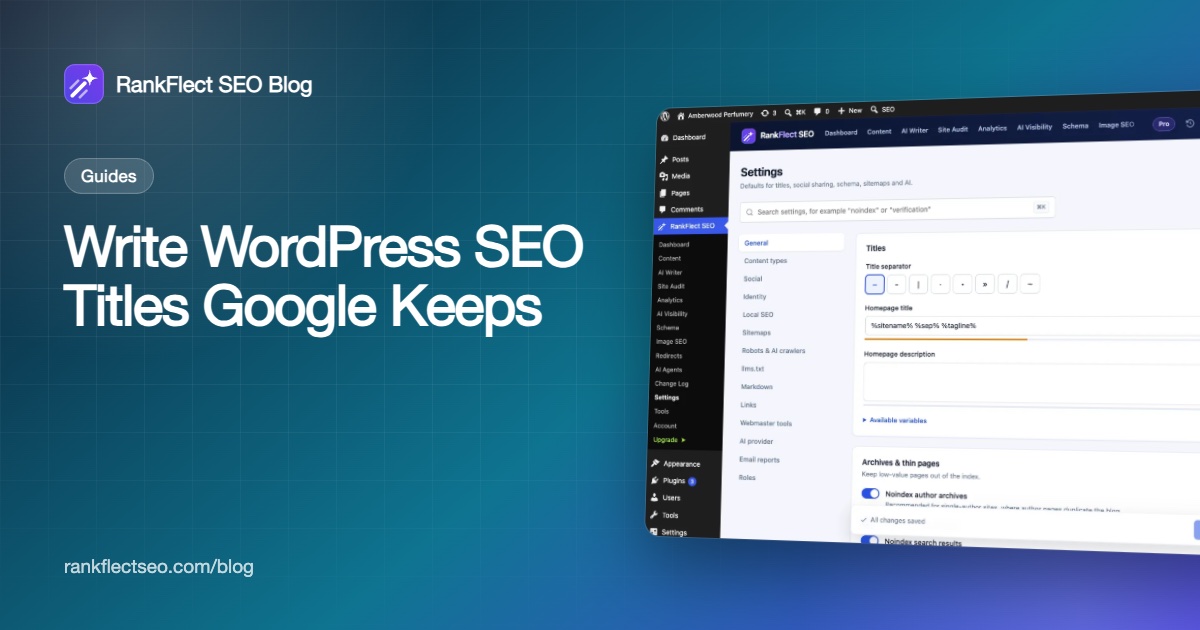
- Go to RankFlect SEO → Settings → General.
- Under Titles, pick a Title separator. The default is
–; you can also choose-,|,·,•,»,/or~. This is what%sep%outputs everywhere. - Edit the Homepage title. The default is
%sitename% %sep% %tagline%, and a meter shows its length against 60 characters. - Click Save changes.
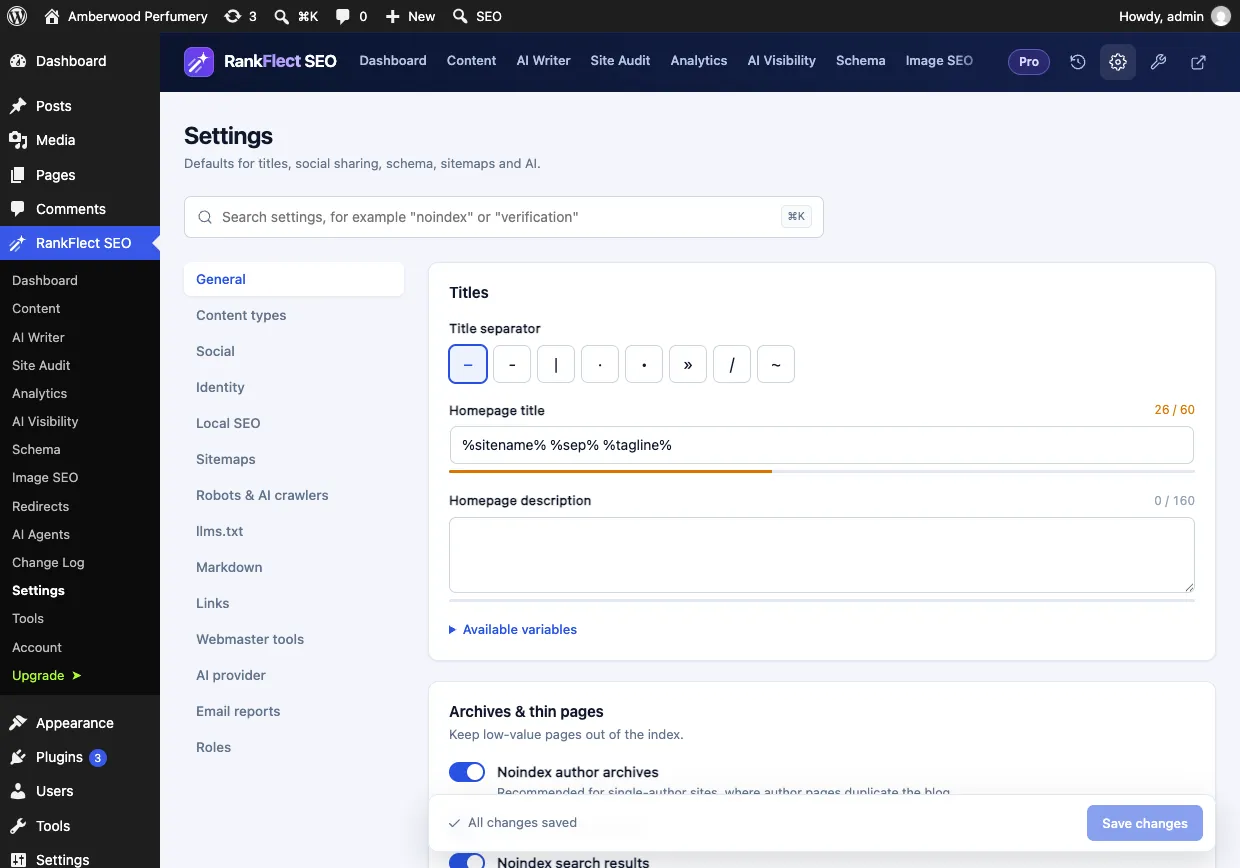
Your home page title deserves extra care. Google's guidelines suggest more descriptive text on the home page, so "Amberwood – Small-Batch Perfumes and Attars" says far more than "Amberwood – Just another WordPress site". Check that your WordPress tagline under Settings → General is not still the default.
Step 2: Set a title template for each content type
- Go to RankFlect SEO → Settings → Content types.
- Each public post type (Posts, Pages, Products and custom types) has a Title template. The default is
%title% %sep% %sitename%. - Change it where a pattern helps. A recipe site could use
%title% Recipe %sep% %sitename%; a shop could add the price with%title% %sep% %wc_price% %sep% %sitename%. - Further down, the Taxonomies card sets the title template for category and tag archives (default
%term% %sep% %sitename%). - Click Save changes.
A template change updates every item of that type that has no custom title, which makes it the fastest way to fix titles across a whole site. Every variable is listed with examples in Title and description variables, and the content type options are in Settings for posts, pages and custom post types.
Step 3: Write a custom SEO title for an important post
- Open the post in the block editor and click the RankFlect SEO button in the toolbar.
- In the General section, type into SEO Title. The placeholder shows the title the template produces today.
- Use the Use variables chips (+ Title, + Site Title, + Separator) if you want to keep part of the pattern. The Preview line shows the final text.
- Watch the bar under the field. It shows the character count and the pixel width, with the note that Google cuts titles wider than about 580 pixels.
- Click Save.
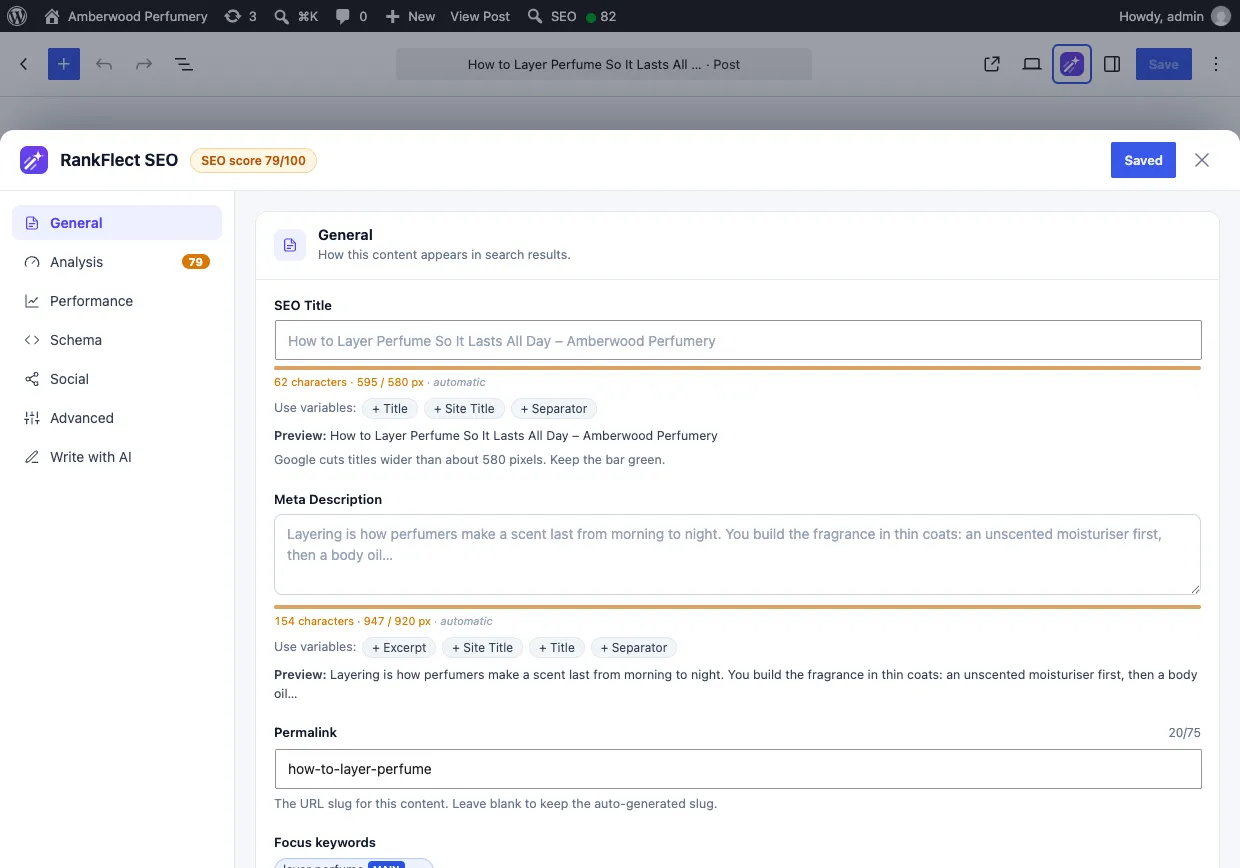
The screenshot shows why pixels matter: a 62-character title measures 595 pixels, just over the width Google tends to show, so the bar turns orange. Trimming a few words would bring it back. More about this panel in Edit SEO in the block editor.
For categories and tags, open the term under Posts → Categories and fill in the SEO title in its RankFlect SEO section. See SEO for categories, tags and taxonomies.
How to write a good WordPress SEO title
Google's starter guide puts it in one line: a good title is "unique to the page, clear and concise, and accurately describes the contents of the page." Here is what that means in practice.
- Lead with the topic. Put the words a searcher would use near the start. "Rose Attar: How It Is Made and How to Wear It" beats "Our Story Behind a Very Special Bottle".
- Keep it concise. Google sets no hard limit, but it truncates long titles. About 30–60 characters, checked against the pixel bar, is a safe target.
- Make every title unique. Two pages with the same title are hard for Google and searchers to tell apart. Titles that differ by one word are not much better.
- Brand once, at the end or start. Google recommends the site name at the beginning or end, separated by a delimiter such as a hyphen, colon or pipe. Do not repeat a long slogan on every page.
- No keyword lists. Repeating the same phrase or listing variations looks spammy and invites a rewrite.
- Keep dates honest. A year in the title can help for "best of" lists, but an old year is one of Google's named rewrite triggers. If you use
%year%, update the content too, not just the title. - Match the page. The title should describe what the page delivers. Clickbait that the content does not back up loses the click it won.
Your SEO title also feeds social sharing: in RankFlect SEO, the social title defaults to the SEO title unless you set one in the Social section.
Find and fix weak titles across the site
Once the templates are set, look for the pages that still need attention.
- Bulk SEO editor. RankFlect SEO → Content lists every post with its SEO title, the title it outputs today as a placeholder, and a length bar. Filter by Missing custom title and edit inline. See The bulk SEO editor.
- Duplicate titles. The Duplicate titles & descriptions tab groups pages that output the same title, including pages that share it through a template.
- Site audit. The audit flags duplicate titles, titles longer than 60 characters, titles shorter than 25 characters and focus keywords missing from the title. In RankFlect SEO Pro, Fix with AI can rewrite those titles in batches.
- Search Console. Pages with many impressions and a low click-through rate often have a title that does not match the search. Rewrite those first. Our guide to connecting Search Console to WordPress shows where to find them.
Troubleshooting WordPress SEO titles
I see two title tags in the page source
Your theme probably hard-codes a <title> in its header.php instead of using WordPress's title-tag support. RankFlect SEO replaces the title WordPress generates, but it cannot remove one the theme prints directly. Ask the theme author to switch to add_theme_support( 'title-tag' ).
I changed the template but one page did not change
That page has its own SEO title, which always wins over the template. Clear its SEO Title field, or check it in the bulk editor. The order RankFlect SEO follows is explained in Set up titles and meta descriptions.
Google still shows the old title
Google has to recrawl the page first, which can take days or weeks. If it still shows something else afterwards, it has chosen to rewrite the title. Compare your title with the H1 and the page content, and remove anything vague, repeated or outdated.
If you are starting fresh, you can get RankFlect SEO free; titles are set from templates on activation, so every page has a sensible SEO title before you write a single custom one.
Frequently asked questions
What is the ideal SEO title length in WordPress?
Google has no fixed character limit, but it cuts titles to fit the device width. RankFlect SEO's length bar warns above about 580 pixels. In practice, 30–60 characters keeps most titles whole. A pixel-based length bar is more accurate than counting characters, because wide letters take more space.
Should the SEO title be the same as the post title?
It can be, and that is the default. Change it when the on-page headline is long, playful or missing the words people search. Keep both describing the same topic so Google does not see them as a mismatch.
Should I put my site name in every SEO title?
Adding it once at the end with a separator is common and follows Google's guidance. Drop it on pages where the title is already long, since Google may show your site name separately anyway.
Why does Google rewrite my WordPress title?
Google rewrites titles that are vague, too long, stuffed with keywords, repeated across pages, out of date or different from the main heading. Fixing those issues makes it much more likely Google keeps your title.
Can I change the title of my WordPress home page?
Yes. With RankFlect SEO, go to Settings → General and edit Homepage title. If your home page is a static page with its own SEO title, that page's title is used instead.
- #seo title
- #title tag
- #wordpress seo
- #on-page seo
Written by
RankFlect SEO TeamThe people who build RankFlect SEO, the WordPress SEO plugin with a built-in MCP server. We write about what we learn shipping SEO tools for AI search.
All articles →Let AI agents fix your SEO. You keep the undo button.
RankFlect SEO is free for unlimited sites, with a built-in MCP server, approval for every change and no AI credits.