SEO Competitor Analysis: A 7-Step Guide to Outrank the Pages Above You
A practical 7-step SEO competitor analysis: find your real search competitors, compare their pages with yours and turn the gaps into changes that help you rank.
In this article
- Key takeaways
- What an SEO competitor analysis is (and is not)
- How to do an SEO competitor analysis in 7 steps
- 1. Pick the keywords that matter
- 2. Find who actually ranks
- 3. Read the search results page for intent
- 4. Compare the pages side by side
- 5. Find the content gaps
- 6. Check authority and experience
- 7. Turn findings into an action plan
- Common mistakes in SEO competitor analysis
- Run a page-level competitor analysis in WordPress with RankFlect SEO
- Frequently asked questions
- How do I find my SEO competitors?
- Can I do SEO competitor analysis for free?
- How often should I do a competitor analysis?
- Is it okay to copy a competitor's headings?
SEO competitor analysis means studying the pages that outrank you for the searches you care about, working out why they rank, and turning the gaps into a list of improvements for your own pages. The useful version is page-level and keyword-level: not "what is our rival company doing?" but "why does this page beat ours for this query?" This guide walks through a 7-step process that works for blogs, local businesses and WooCommerce shops, with free tools and without copying anyone.
Key takeaways
- Your search competitors are the pages ranking for your keywords. They are often not your business competitors.
- Start with the search results page itself: its format, features and intent tell you what Google thinks searchers want.
- Compare pages side by side: titles, headings, depth, schema, internal links and speed.
- Look for gaps you can fill with original value. Google asks whether content adds "substantial value when compared to other pages in search results".
- Turn findings into a short, prioritized action list, then re-check a few weeks after changes.
What an SEO competitor analysis is (and is not)
A business competitor sells what you sell. A search competitor is whoever ranks for the queries you target. For a recipe blog, that might be a national newspaper, a forum thread and a video site. For a local plumber, it might be directories rather than other plumbers.
That is why a good SEO competitor analysis starts from keywords, not company names. Each important keyword has its own set of competitors, and the reasons they rank can be different for every query.
It is also not a copying exercise. Google's guidance on creating helpful content asks whether content avoids "simply copying or rewriting" other sources and instead provides substantial additional value. The goal is to understand what searchers expect, then do it better and differently.
How to do an SEO competitor analysis in 7 steps
1. Pick the keywords that matter
Choose a short list of keywords that bring, or could bring, real business: product and category terms for a shop, service plus location for a local business, core topics for a blog. In Google Search Console, look for queries where you already get impressions but rank on page two. Those are usually the quickest wins.
Keep the list small at first. Analysing five keywords properly beats skimming fifty.
2. Find who actually ranks
Search each keyword in a private browser window, in the country you target, on mobile as well as desktop. Note the top five to ten organic results. Tools can automate this, but looking yourself shows you things a spreadsheet hides, such as which results have images, star ratings or FAQs.
Group what you find. If the same two or three sites appear across many of your keywords, those are your main search competitors.
3. Read the search results page for intent
Before comparing pages, study the results page as a whole:
- Format: are the top results guides, lists, product pages, category pages, videos or tools?
- Angle: are they for beginners, buyers, or experts? Do titles mention a year, a price or a number of steps?
- Features: are there image packs, video results, a local map, "People also ask" questions or AI answers?
If every top result is a product category page and yours is a blog post, the gap is the type of page, not the wording. No amount of on-page tuning fixes a mismatch in intent.
4. Compare the pages side by side
Now open the competitor page and yours together and compare the on-page basics:
- Title and meta description: does theirs use the keyword and give a clearer reason to click?
- H1 and subheadings: which subtopics do their H2s cover that yours do not?
- Depth: word count is a rough signal, not a target. A longer page ranks when the extra length answers more of the searcher's questions.
- Structured data: do they use Product, Recipe, FAQ, HowTo or other schema types that you do not?
- Internal links: how many links point to and from their page within their site? Strong internal linking signals importance.
- Images and media: original photos, diagrams, videos, and whether images have alt text.
- Freshness: is their page clearly updated more recently?
5. Find the content gaps
List the topics and questions that two or more of the ranking pages cover and yours does not. Topics that all of them cover are what searchers expect to find. Add the questions from "People also ask" and from your own customer emails or support tickets.
Then look for what none of them do well. That is your chance to add something original: first-hand testing, real photos, your own data, a worked example, a clear comparison table or a calculator. This is the part competitors cannot copy back easily.
6. Check authority and experience
Some gaps are not on the page. Look at:
- Backlinks: whether the ranking pages have links from relevant, respected sites. Backlink tools give estimates; even a quick look shows whether a page is widely cited.
- Who wrote it: author bios, credentials and first-hand experience, which matter especially for health, money and safety topics.
- Speed and usability: run the competitor URL and yours through PageSpeed Insights. A much faster, cleaner page has an edge when content quality is similar.
Authority takes time to build, so do not let it stop you. Many pages outrank stronger sites simply by matching intent better.
7. Turn findings into an action plan
For each keyword, write down three to five concrete changes, ordered by effort and likely impact. For example:
- Rewrite the title to lead with the keyword and a clear benefit.
- Add sections for the two subtopics every competitor covers.
- Add FAQ or Product schema to match the result features.
- Link to the page from three related posts.
- Replace stock images with original photos.
Make the changes, note the date, and check rankings and clicks in Search Console after a few weeks. Repeat the analysis every quarter for your most important keywords, since results pages change.
Common mistakes in SEO competitor analysis
- Studying the wrong competitors. Your biggest rival company may not rank for your keywords at all.
- Chasing word count. Matching a 4,000-word page with filler rarely helps. Cover the subtopics, then stop.
- Ignoring intent. Comparing your blog post to a competitor's product page wastes time.
- Copying structure exactly. If your page looks like a rewrite of theirs, it adds nothing new for Google or readers.
- Analysing once. Rankings move. A one-off report gets stale within months.
Run a page-level competitor analysis in WordPress with RankFlect SEO
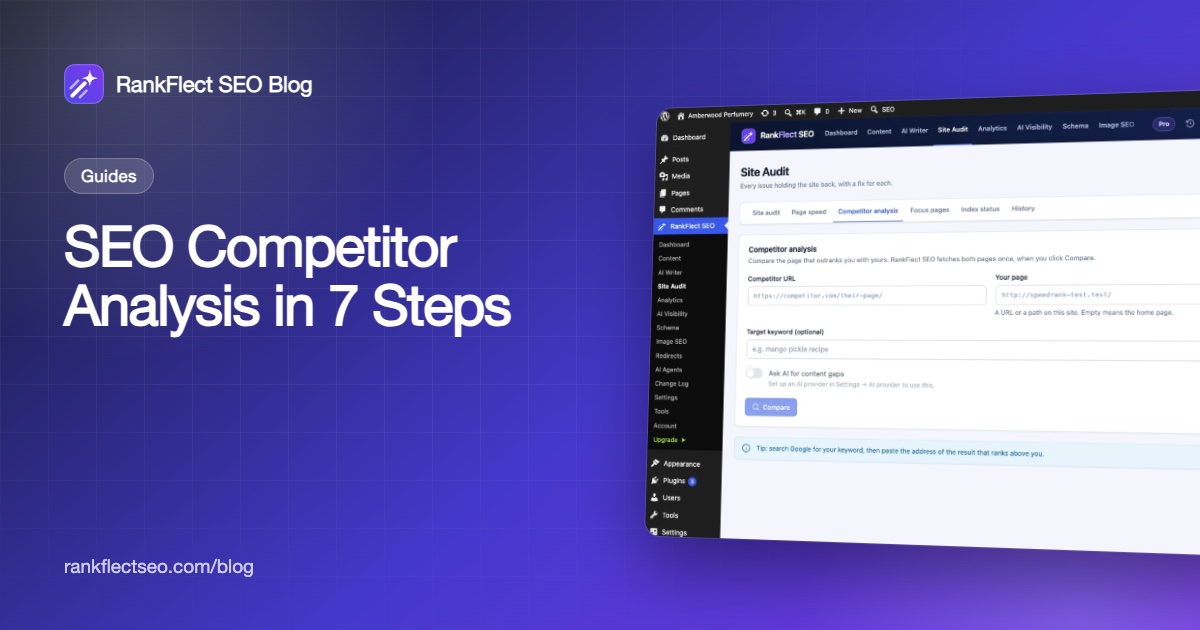
Step 4 is the slowest to do by hand. RankFlect SEO's free competitor analysis does it from inside WordPress:
- Search Google for your keyword and copy the address of the result that ranks above you.
- Go to RankFlect SEO → Site Audit → Competitor analysis.
- Paste the address in Competitor URL, and enter your page's URL or path in Your page (empty means your home page).
- Optionally add a Target keyword to check keyword use on both pages.
- Optionally turn on Ask AI for content gaps, which needs your own AI provider key.
- Click Compare.
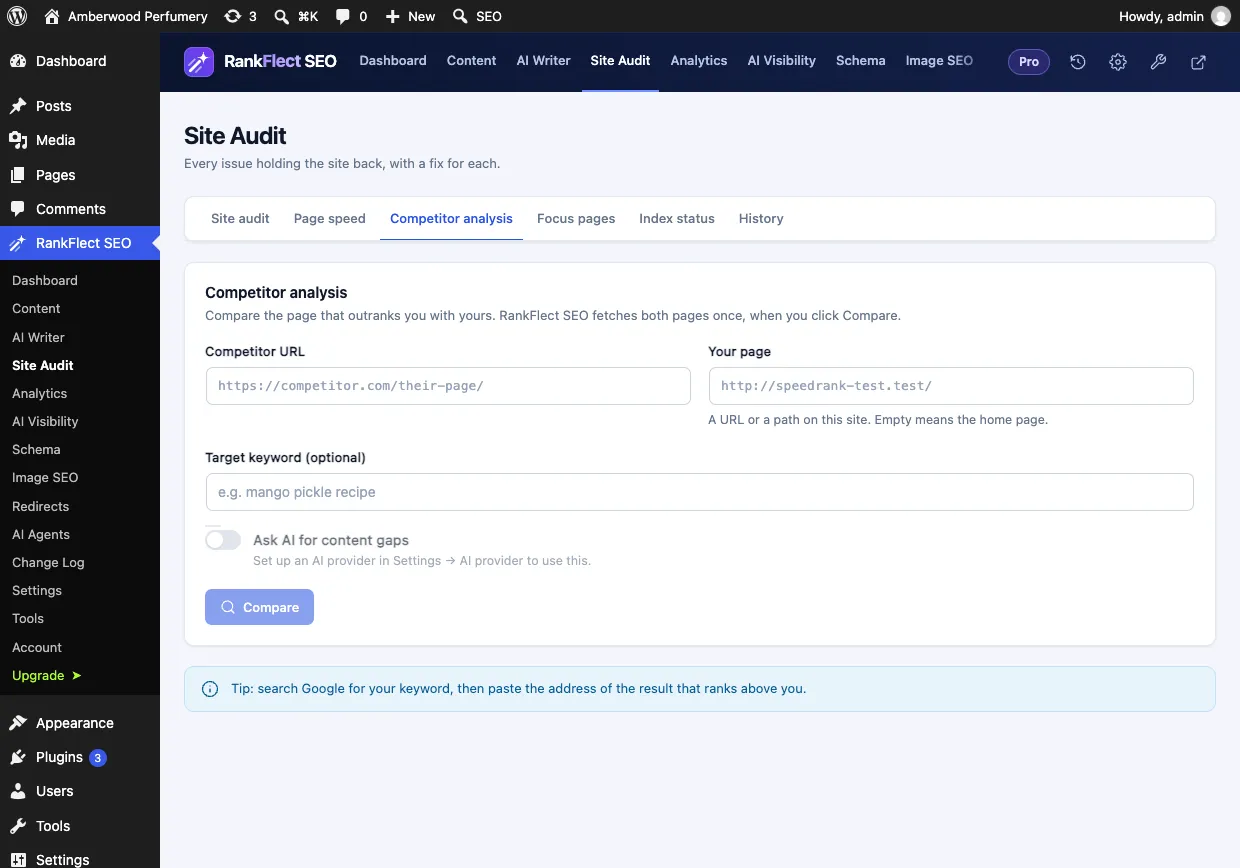
RankFlect SEO fetches both pages once, only when you click Compare. The results include a plain list of where the competitor is ahead (for example more H2 sections, schema types you do not use, or the keyword in their title but not yours), the competitor's sections that your page does not seem to cover, and a side-by-side table of titles, descriptions, headings, word counts, schema types, internal and external links, images without alt text, canonical and Open Graph tags. With the AI option, you also get topics and questions to add, improvements and a title idea. Your last 10 comparisons are saved, and Compare again refreshes one after you update your page.
A tip from the docs that matches the process above: compare against two or three page-one results, not just one. Topics that all of them cover are the ones searchers expect.
Two other free features help turn the findings into action. Focus keywords let you set a main keyword per post, with a score and a warning when another post on your site already targets the same keyword; RankFlect SEO Pro adds related keywords, each with its own score. And the site audit catches the site-wide basics, such as missing descriptions or thin posts, that competitors may simply have got right. If you want an outline for a new page, the AI writer can turn a keyword into a content brief.
In RankFlect SEO Pro, Focus pages adds a ranking diagnosis for up to 25 important pages, and Search Console opportunities show keywords close to page one, which are good candidates for this analysis. You can download RankFlect SEO for free to try the competitor comparison on your own pages.
Frequently asked questions
How do I find my SEO competitors?
Search your most important keywords and note which sites rank in the top results. Sites that appear across many of your keywords are your main search competitors. SEO tools can list them automatically, but a manual check is a good start.
Can I do SEO competitor analysis for free?
Yes. Google Search, Search Console and PageSpeed Insights are free, and a page-level comparison can be done by hand or with a free plugin feature. Paid tools mainly add keyword and backlink data at scale.
How often should I do a competitor analysis?
Review your most important keywords every quarter, and whenever a page suddenly drops in rankings. A drop often means a competitor improved their page or a new type of result appeared.
Is it okay to copy a competitor's headings?
Covering the same subtopics is fine, because searchers expect them. Copying their wording or structure is not useful. Google rewards pages that add original value, so use the gaps as a checklist and write in your own words.
- #competitor analysis
- #content gap
- #keyword research
- #on-page seo
Written by
RankFlect SEO TeamThe people who build RankFlect SEO, the WordPress SEO plugin with a built-in MCP server. We write about what we learn shipping SEO tools for AI search.
All articles →Let AI agents fix your SEO. You keep the undo button.
RankFlect SEO is free for unlimited sites, with a built-in MCP server, approval for every change and no AI credits.