Nofollow Links in WordPress: When to Use Them and 3 Ways to Add Them
Nofollow, sponsored or ugc? When Google wants each one, and three ways to add them in WordPress, from a single link to site-wide rules.
In this article
- Key takeaways
- What nofollow, sponsored and ugc mean
- Nofollow is a hint, not a block
- When to use nofollow links in WordPress
- Paid and affiliate links: sponsored
- Comments and community posts: ugc
- Links you don't trust: nofollow
- When not to use nofollow
- Method 1: Add nofollow to a single link in the block editor
- Method 2: Apply nofollow links site-wide in WordPress with rules
- Use the domain lists for exceptions
- What the rules touch, and what they don't
- Suggested setups
- Method 3: Nofollow every link on one page
- Nofollow and your content analysis score
- How to check your nofollow links
- Frequently asked questions
- Should I make all external links nofollow in WordPress?
- Are affiliate links supposed to be nofollow?
- Do nofollow links help SEO?
- Does WordPress add nofollow to comment links automatically?
- What is the difference between nofollow and noindex?
Nofollow links in WordPress are links with rel="nofollow" (or the more specific sponsored or ugc) that tell Google you don't vouch for the page you are linking to. You can add the attribute to one link in the block editor's link settings or in the HTML, or apply it to every external link on the site with an SEO plugin. The bigger question is when to use it: Google asks for it on paid, affiliate and user-generated links, not on ordinary links to good sources.
This guide covers what each rel value means, when to use which, three ways to add them in WordPress, and how to check the result.
Key takeaways
- Use
rel="sponsored"for paid and affiliate links,rel="ugc"for user-generated links andrel="nofollow"when neither fits but you don't want to endorse the page. - Since 2019 Google treats all three as hints, not strict commands.
- Normal editorial links to useful sources don't need nofollow. Linking out naturally is fine.
- Don't nofollow your own internal links. Use noindex for pages you want out of search.
- For a whole site, rules applied at render time are safer than editing hundreds of posts, because switching them off restores your links exactly as written.
What nofollow, sponsored and ugc mean
The rel attribute on a link describes your relationship to the page it points to. Google's guide to qualifying outbound links defines three values:
sponsored: links that are "advertisements or paid placements." This covers sponsored posts, paid listings and affiliate links where you earn a commission.ugc: links in user-generated content, such as comments and forum posts.nofollow: for cases where the other values don't apply and you don't want Google to associate your site with, or crawl, the linked page.
You can combine values in one attribute, such as rel="ugc nofollow". Google says you may list them separated by spaces or commas.
Nofollow is a hint, not a block
In 2019 Google changed how nofollow works: all three attributes "are treated as hints about which links to consider or exclude within Search." For crawling and indexing, nofollow became a hint on March 1, 2020. In practice, Google usually won't follow these links, but the linked page may still be crawled if Google finds it elsewhere, for example in a sitemap. The same announcement says there is "absolutely no need to change any nofollow links that you already have."
When to use nofollow links in WordPress
Ask why the link exists.
Paid and affiliate links: sponsored
If money, free products or any other exchange influenced the link, mark it. Google's spam policies count buying or selling links that pass ranking credit as link spam. sponsored is the preferred value; nofollow is still accepted. Affiliate sites, coupon sites and review sites with commission links should mark them consistently.
Comments and community posts: ugc
WordPress already adds rel="nofollow ugc" to links in comments and to commenters' website links. If you run a forum, a membership community or guest submissions through other plugins, check that those links carry ugc too.
Links you don't trust: nofollow
Use plain nofollow for links you must include but don't want to vouch for, such as a page you are criticising or a site you can't assess.
When not to use nofollow
- Editorial links to good sources. Citing a study, a documentation page or a news report is normal and helps readers. RankFlect SEO's own content analysis rewards having at least one outbound link to a source.
- Internal links. Google says not to use nofollow to control crawling within your own site. To keep a page out of search, use noindex.
- Every external link by reflex. Nofollow on all outbound links isn't needed for ordinary editorial links, and it hides useful signals about which sources you trust.
Method 1: Add nofollow to a single link in the block editor
For an occasional sponsored or untrusted link, set the attribute on that link only.
- Select the linked text in your post and click the link to open its settings.
- Click the edit (pencil) icon, then open Advanced.
- Turn on Mark as nofollow in current versions of the block editor. Save the link and update the post.
The toggle only adds nofollow. To add sponsored or ugc, edit the HTML: select the block, open the three-dot menu, choose Edit as HTML and change the link to:
<a href="https://example.com/product" rel="sponsored nofollow">product</a>Button blocks have a Link rel field in their settings sidebar where you can type the values directly. In the Classic Editor, switch to the Text tab and add the attribute to the <a> tag.
Method 2: Apply nofollow links site-wide in WordPress with rules
Editing links one by one doesn't scale on an affiliate site with hundreds of posts, and it is easy to miss old ones. A site-wide rule applies the attribute to every external link as pages are shown.
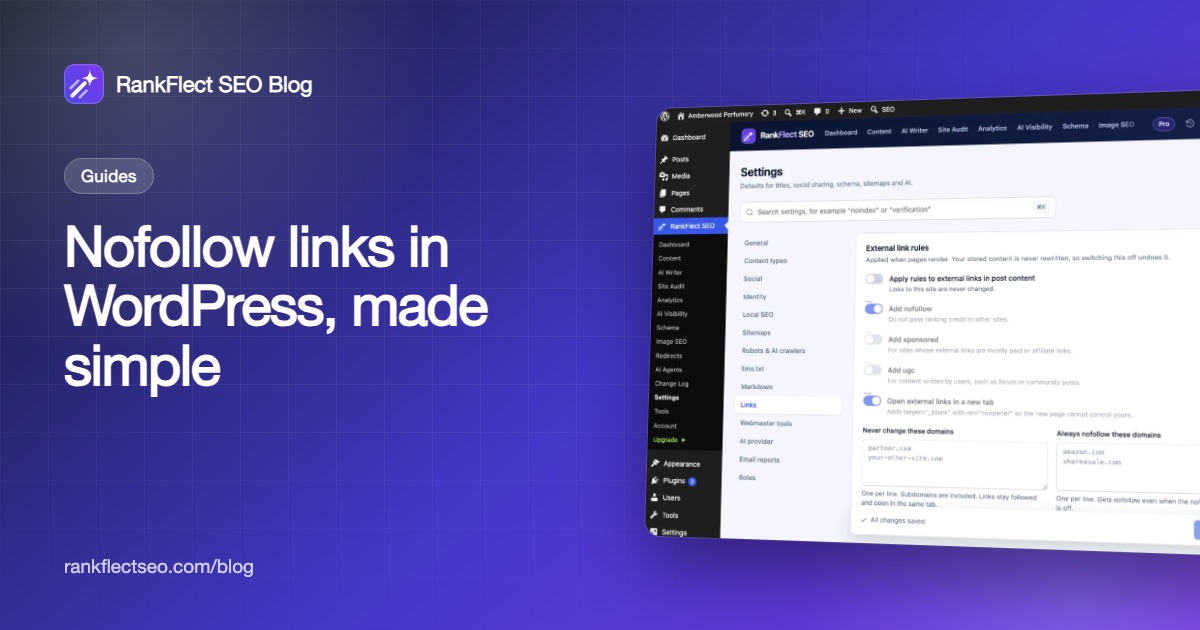
In RankFlect SEO this is the free External link rules module:
- Go to RankFlect SEO → Settings → Links.
- Turn on Apply rules to external links in post content. It is off by default, and you can also switch it on from the Modules card on the Dashboard.
- Choose your rules: Add nofollow, Add sponsored, Add ugc and Open external links in a new tab.
- Fill in the domain lists if you need exceptions (below).
- Click Save changes.
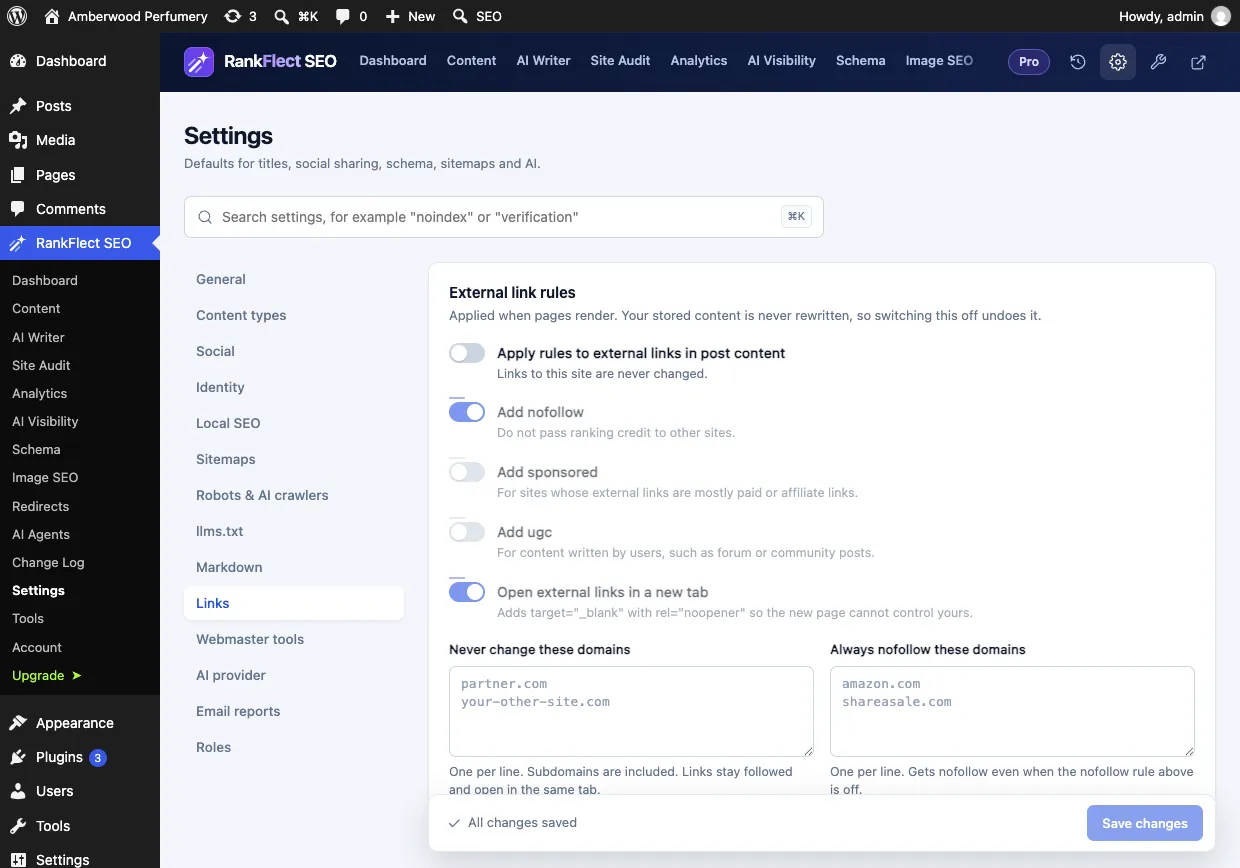
The rules are applied when pages render. Your stored content is never rewritten, so switching the module off returns every link to exactly what you wrote. The full settings are in External link rules.
Use the domain lists for exceptions
- Never change these domains: links to these domains, and their subdomains, stay followed and open in the same tab. Use it for trusted sources and your own other sites.
- Always nofollow these domains: links to these domains get nofollow even when the general nofollow rule is off. Put your affiliate networks and marketplaces here.
The second list is the precise option for most blogs: leave Add nofollow off so editorial links stay normal, and list only the domains you are paid to link to.
What the rules touch, and what they don't
- Only external links: a link counts as external when it points to another host name. A subdomain of your own site counts as external, so add it to Never change these domains if needed.
- Only post content, after blocks, shortcodes and page builders have produced their HTML. Menus, widgets and comments are not changed.
- Existing
relvalues you set by hand are kept; the rules only add to them. - Any external link that opens in a new tab gets
rel="noopener". - RSS feeds and the editor show links as written.
Suggested setups
- Blog that cites sources: Add nofollow off; put paid or spammy domains in Always nofollow these domains.
- Affiliate or review site: Add nofollow and Add sponsored on; put trusted editorial sources in Never change these domains.
- Community content: Add ugc and Add nofollow on.
Method 3: Nofollow every link on one page
A robots meta tag with nofollow tells search engines not to follow any link on that page. It is a blunt tool, useful for a page full of user-submitted or paid links that you can't mark individually.
In RankFlect SEO, open the post in the block editor, click the RankFlect SEO button (see Edit SEO in the block editor), choose Advanced, turn on Robots Meta Override and tick No follow. In the Classic Editor and Elementor, use Do not follow links (nofollow). See Noindex, nofollow and canonical URLs. For most pages, marking individual links is the better choice.
Nofollow and your content analysis score
RankFlect SEO's editor checks include "Outbound links to sources", which passes when a post has at least one link to another site. It counts every external link whatever its rel value, so nofollowing a link won't change that check. Internal links are counted separately. See Content analysis checks.
How to check your nofollow links
- Inspect the link. Right-click the link on the live page, choose Inspect, and look at the
relattribute. - View the page source and search for
rel="to see every link's values at once. With site-wide rules, check the front end, not the editor, because the rules apply only when pages render. - Clear caches. A page cache can serve the old HTML after you change rules.
- Audit outbound links from time to time. Affiliate programmes change domains, and old sponsored posts are easy to forget.
If you are running through a wider list of on-page tasks, our WordPress SEO checklist puts link attributes in context with the rest.
Frequently asked questions
Should I make all external links nofollow in WordPress?
No. Google asks for sponsored on paid links and ugc on user-generated links, and followed links to good sources are normal. Mark only links that are paid, user-generated or untrusted.
Are affiliate links supposed to be nofollow?
Affiliate links are paid links, so mark them. Google prefers rel="sponsored", and nofollow is also accepted. Many sites use both together.
Do nofollow links help SEO?
For the site that receives them, Google treats nofollow as a hint and may still use the link in some way, but don't count on it for rankings. Nofollow links can still send visitors and help people discover a page.
Does WordPress add nofollow to comment links automatically?
Yes. WordPress adds rel="nofollow ugc" to links in comments and to commenter website links. You don't need a plugin for that.
What is the difference between nofollow and noindex?
Nofollow applies to links: it asks search engines not to follow or credit them. Noindex applies to a page: it asks search engines to leave that page out of their results. They solve different problems and are set in different places.
External link rules with domain allow and deny lists are part of the free plugin. To set them up in a couple of minutes, download RankFlect SEO for free.
- #nofollow
- #sponsored links
- #affiliate links
- #rel attribute
- #external links
Written by
RankFlect SEO TeamThe people who build RankFlect SEO, the WordPress SEO plugin with a built-in MCP server. We write about what we learn shipping SEO tools for AI search.
All articles →Let AI agents fix your SEO. You keep the undo button.
RankFlect SEO is free for unlimited sites, with a built-in MCP server, approval for every change and no AI credits.