Google News Sitemap for WordPress: Rules, Setup and Fixes
Who needs a Google News sitemap, the exact rules Google sets, how to add one to WordPress and how to fix the most common problems.
In this article
- Key takeaways
- What is a Google News sitemap?
- Do you need a Google News sitemap?
- Google's rules for news sitemaps
- How to add a Google News sitemap to WordPress
- Set it up in RankFlect SEO Pro
- Pair the news sitemap with NewsArticle schema
- Submit and check your news sitemap
- Common news sitemap problems
- The news sitemap is empty
- Articles are missing
- Wrong publication name
- Old dates on updated articles
- Frequently asked questions
- Does a Google News sitemap get me into Google News?
- Is a news sitemap the same as an XML sitemap?
- How many articles can a Google News sitemap contain?
- Should I include old articles in my news sitemap?
- Does WordPress create a news sitemap by default?
A Google News sitemap lists the articles you published in the last two days, with each one's publication name, language, publication date and title, so Google can find fresh news quickly. WordPress doesn't create one on its own, so a Google News sitemap for WordPress comes from a plugin or custom code. This guide explains who actually needs one, the exact rules Google sets, how to add one to WordPress and how to check that it's working.
Key takeaways
- A news sitemap is for sites that publish timely news articles. If you don't publish news, your regular XML sitemap already covers your posts.
- Google says sites are automatically considered for Google News, with no application required. Eligibility depends on your content and on following Google News policies, not on having a news sitemap.
- Only include articles from the last two days, and at most 1,000 news entries per sitemap.
- Each entry needs a publication name, language, original publication date and title.
- Keep one news sitemap that updates as you publish. Don't create a new file for each article.
What is a Google News sitemap?
A Google News sitemap is an XML sitemap with extra news: tags. Where a regular sitemap says "these URLs exist", a news sitemap says "these are news articles, published at this moment, by this publication". That helps Google discover new articles quickly and understand them as news.
Here is what an entry looks like, based on the example in Google's news sitemap documentation:
<?xml version="1.0" encoding="UTF-8"?>
<urlset xmlns="http://www.sitemaps.org/schemas/sitemap/0.9"
        xmlns:news="http://www.google.com/schemas/sitemap-news/0.9">
  <url>
    <loc>https://example.com/2026/11/city-council-budget-vote/</loc>
    <news:news>
      <news:publication>
        <news:name>Example Daily</news:name>
        <news:language>en</news:language>
      </news:publication>
      <news:publication_date>2026-11-02T08:30:00+00:00</news:publication_date>
      <news:title>City council passes 2027 budget</news:title>
    </news:news>
  </url>
</urlset>
Do you need a Google News sitemap?
Many WordPress tutorials make it sound like every blog should have one. That isn't the case. Ask yourself two questions.
Do you publish news? Reporting on current events, local news, industry news or time-sensitive updates fits. Evergreen how-to guides, product pages and recipes don't, and they're better served by your regular XML sitemap.
Do you publish regularly? A news sitemap only lists the last two days of articles. If you post once a month, it will be empty most of the time. That's allowed (Google says an empty news sitemap causes no problems), but it doesn't do much for you.
About eligibility: Google's July 2021 post answering top questions about Google News says sites are automatically considered for Google News and news surfaces in Search, with no application required. In 2025 Google also moved to automatically generated publication pages, and Google News stopped using RSS feeds and web locations submitted in Publisher Center. A news sitemap helps Google find your articles; it doesn't make a site eligible on its own.
Google's rules for news sitemaps
Google's documentation is short and strict. These are the rules that matter:
- Two days only. Include only articles created in the last two days. Remove older URLs, or remove their
news:newstags if they share a sitemap with other content. - 1,000 entries maximum. A news sitemap can have up to 1,000
news:newstags. Split it if you publish more than that in two days. - Update, don't multiply. Add fresh articles to the same sitemap as they're published. Google says not to create a new sitemap with each update.
- Publication name must match.
news:namemust match the name of your publication as it appears on news.google.com, ignoring anything in parentheses. - Language as an ISO 639 code. Two or three letters, such as
enorde, withzh-cnandzh-twas the exceptions for Chinese. - Original publication date. Use the date and time the article was first published, in W3C format, not the time it was added to the sitemap or last edited.
- The real title.
news:titleis the article's title as shown on your site, without the author, publication name or date.
You may still see old tutorials mention news:keywords, news:genres or stock tickers. Google's current documentation lists only the required tags above, so there's no need to add more.
How to add a Google News sitemap to WordPress
WordPress core sitemaps don't include news tags; the WordPress 5.5 announcement left news, image and video extensions to plugins. So your options are:
- An SEO plugin with a news sitemap feature. Several major SEO plugins offer one, often in a paid version or add-on at the time of writing. Check the vendor's own documentation for details.
- A dedicated news sitemap plugin. Useful if your SEO plugin doesn't have the feature.
- Custom code. Possible, but you have to handle the two-day window, caching, noindexed posts and the 1,000-entry cap yourself.
Use only one. Two plugins generating news sitemaps can submit conflicting data.
Set it up in RankFlect SEO Pro
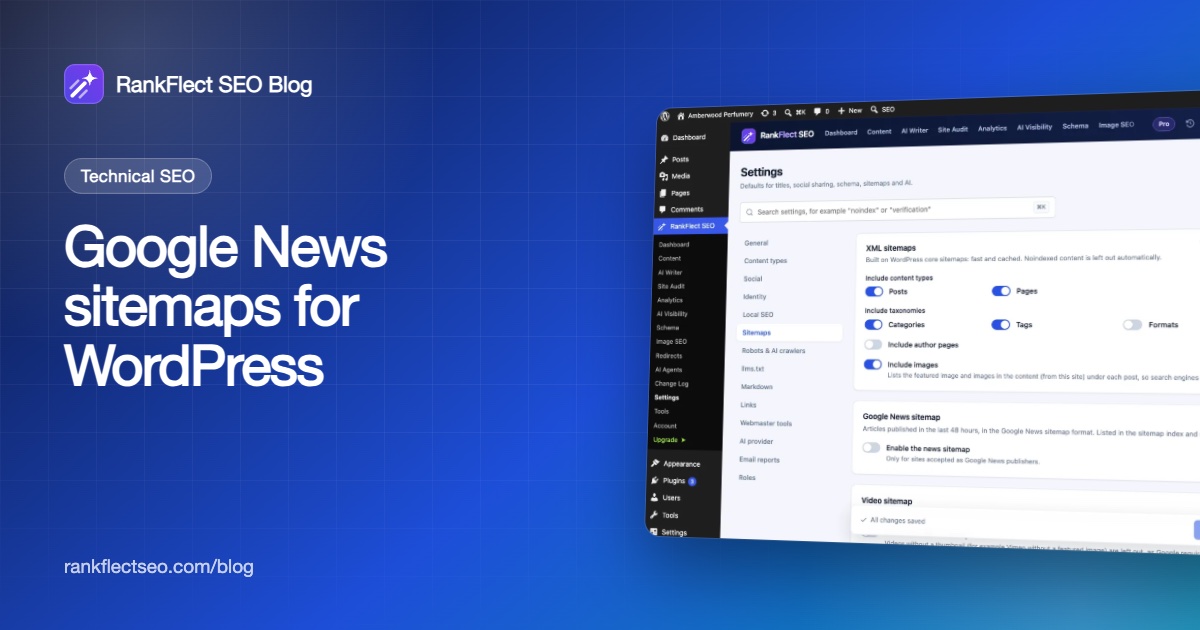
The Google News sitemap is part of RankFlect SEO Pro (the regular XML sitemaps are free). It's off by default.
- Go to RankFlect SEO → Settings → Sitemaps.
- In the Google News sitemap card, turn on Enable the news sitemap.
- Set the Publication name. It defaults to your site name, and it must match your name on news.google.com exactly.
- Set the Language as an ISO 639 code, or leave it empty to use the site language.
- Choose the Content types that count as news articles. The default is Posts. If you publish news in a custom post type, select it here.
- Click Save changes.
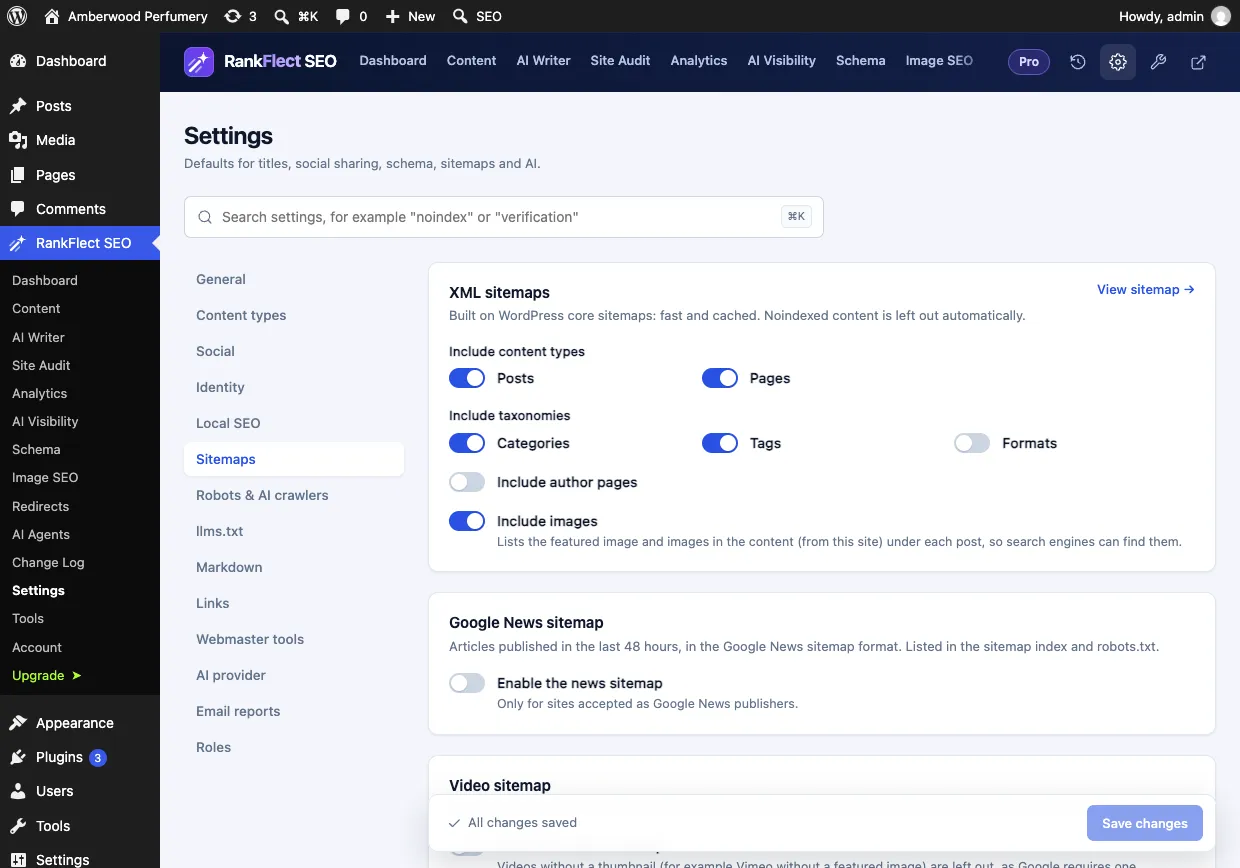
On the free plugin, that same screen shows the News and video sitemaps card with a PRO label, as in the screenshot above.
Once it's on, the sitemap is at /wp-sitemap-news-1.xml. It follows Google's rules for you: it lists up to 1,000 articles from the last 48 hours with their publication date and title, leaves out noindexed and password-protected posts, and is cached for only 5 minutes so new articles appear quickly. It's added to your sitemap index at /wp-sitemap.xml and to your robots.txt automatically. On multilingual sites using Polylang or WPML, each language gets its own news sitemap, such as /fr/wp-sitemap-news-1.xml. Full details are in News and video sitemaps.
Pair the news sitemap with NewsArticle schema
A sitemap helps Google find your articles; structured data describes each one on the page itself. Google's article structured data supports NewsArticle, Article and BlogPosting, with properties such as headline, image, author and dates.
In RankFlect SEO (free), every post already gets article schema as part of one connected JSON-LD graph. To mark news posts as NewsArticle:
- For a single post, open the Schema section of the RankFlect SEO panel and pick News article as the page type.
- For a whole content type, go to Settings → Content types and set its Default schema to News article. See Settings for posts, pages and custom post types.
How the graph is built, and where the author and publisher come from, is covered in How RankFlect SEO's schema works. Make sure your Settings → Identity details (name and logo) are filled in, since they become the article's publisher.
Submit and check your news sitemap
- Open it. Visit
/wp-sitemap-news-1.xml(or your plugin's URL). Your latest articles should be there, each with anews:newsblock. - Check robots.txt. Open
/robots.txt. It should contain aSitemap:line for the news sitemap. See Edit robots.txt. - Submit it in Search Console. In Sitemaps, enter
wp-sitemap-news-1.xmland click Submit. Google notes that a separate news sitemap can make tracking easier there. Our Search Console guide covers setup. - Watch for errors. The Sitemaps report flags problems such as unsupported date formats or missing tags.
Common news sitemap problems
The news sitemap is empty
Probably nothing is wrong. It only lists articles from the last two days in the selected content types. If you haven't published in 48 hours, there's nothing to list. Also check that your news posts aren't noindexed.
Articles are missing
Check that the post type is selected under Content types in the news sitemap settings, and that the post isn't password-protected. A page cache or CDN can also serve an old copy; exclude sitemap URLs from caching.
Wrong publication name
If your name in the sitemap doesn't match the one Google shows for you, correct the Publication name setting. Keep it consistent with the site name you use elsewhere.
Old dates on updated articles
That's correct behaviour. news:publication_date should stay the original publication date, even after you update the article.
If you publish news on WordPress and want the news sitemap, NewsArticle schema and regular sitemaps in one place, start with the free plugin and add Pro when you need it. You can download RankFlect SEO free.
Frequently asked questions
Does a Google News sitemap get me into Google News?
No. Google says sites are automatically considered for Google News, and eligibility depends on your content and compliance with Google News policies. A news sitemap only helps Google discover your eligible articles faster.
Is a news sitemap the same as an XML sitemap?
It's an XML sitemap with extra news: tags, limited to articles from the last two days. You still need your regular sitemap for all your other pages and older articles.
How many articles can a Google News sitemap contain?
Up to 1,000 news:news entries, and only articles published in the last two days. If you publish more than 1,000 articles in two days, split them across several news sitemaps.
Should I include old articles in my news sitemap?
No. Google asks you to remove articles older than two days, or remove their news tags. Older articles stay in your regular XML sitemap, where Google keeps finding them.
Does WordPress create a news sitemap by default?
No. WordPress core sitemaps don't include news tags. You need a plugin or custom code. In RankFlect SEO, the news sitemap is a Pro feature at /wp-sitemap-news-1.xml.
- #google news
- #news sitemap
- #xml sitemap
- #technical seo
- #publishers
Written by
RankFlect SEO TeamThe people who build RankFlect SEO, the WordPress SEO plugin with a built-in MCP server. We write about what we learn shipping SEO tools for AI search.
All articles →Let AI agents fix your SEO. You keep the undo button.
RankFlect SEO is free for unlimited sites, with a built-in MCP server, approval for every change and no AI credits.