Custom Post Type SEO: 5 Steps to Rank Recipes, Events and More
Register custom post types the search-friendly way, then give them their own templates, schema, sitemap entries and breadcrumbs.
In this article
- Key takeaways
- What makes custom post type SEO different
- Step 1: Register the post type with SEO in mind
- Step 2: Decide which custom post types to index
- Step 3: Set title and description templates per post type
- Don't forget the archive page
- Step 4: Add the right schema to custom post types
- Schema for hundreds of items at once
- Step 5: Check sitemaps, breadcrumbs and internal links
- XML sitemap
- Breadcrumbs
- Taxonomies and internal links
- A quick custom post type SEO checklist
- Frequently asked questions
- Are custom post types bad for SEO?
- Why doesn't my custom post type show up in my SEO plugin?
- Should custom post type archives be indexed?
- How do I change a custom post type's URL slug without losing rankings?
- Can I use different schema for different custom post types?
Custom post type SEO comes down to five things: register the post type so search engines can reach it, decide whether it should be indexed at all, give it its own title and description templates, add the right schema, and make sure the sitemap and breadcrumbs include it. Recipes, products, events, courses and portfolio items are all custom post types, and they're often the pages that earn the most search traffic. This guide walks through each step, with code for developers and settings for everyone else.
Key takeaways
- A custom post type needs
publicset to true, a cleanrewriteslug and, for the block editor,show_in_rest. Get these right before you publish. - Not every post type should be indexed. Plugins often register internal types; noindex them so they stay out of search and out of the sitemap.
- Give each indexed type its own title and description templates, so hundreds of items get good defaults without manual work.
- Set a default schema type per content type, and add type-specific schema (Recipe, Event, Course) where a rich result exists.
- Changing a post type's slug changes every URL. Plan redirects before you do it.
What makes custom post type SEO different
WordPress treats posts and pages as first-class content: every SEO plugin, theme and sitemap handles them out of the box. A custom post type (CPT) is content you or a plugin registered with register_post_type(), and how well it's handled depends on how it was registered and how your SEO plugin is configured.
The common problems are predictable:
- CPT items use a generic title format, such as just the item name, because no template was set.
- The archive page (for example
/recipes/) has no meta description or a weak title. - Items get the wrong schema, or none.
- Internal plugin types (form entries, layout templates, sliders) leak into the sitemap and search results.
- The URL slug is the internal key (
/rcp_item/) instead of a readable word.
Each one is easy to fix once you know where to look.
Step 1: Register the post type with SEO in mind
If you register the CPT yourself, or use a plugin such as Custom Post Type UI, ACF or Pods to do it, these arguments from the register_post_type() reference matter for search:
public(default false): makes the type visible on the front end. Most other visibility settings inherit from it. If this is false, there's nothing for search engines to see.publicly_queryable: whether items can be reached by URL. Inherits frompublic.has_archive(default false): creates an archive page that lists all items, such as/recipes/. Pass a string to set a custom archive slug.rewrite: sets the URL slug. Without it, WordPress uses the post type key. Setwith_frontto false if your post permalinks start with/blog/and you don't want that prefix on CPT URLs.show_in_rest(default false): needed for the block editor, and for SEO plugins whose panel lives in the block editor.supports: includeexcerpt(for description templates) andthumbnail(for social images and schema) as well astitleandeditor.
A minimal, search-friendly registration looks like this:
register_post_type( 'recipe', array(
    'label'        => 'Recipes',
    'public'       => true,
    'has_archive'  => 'recipes',
    'rewrite'      => array( 'slug' => 'recipes', 'with_front' => false ),
    'show_in_rest' => true,
    'supports'     => array( 'title', 'editor', 'excerpt', 'thumbnail', 'custom-fields' ),
) );
Choose slugs with readable words, separated by hyphens, as Google's URL structure guidelines recommend. After registering or changing a slug, visit Settings → Permalinks and click Save to refresh rewrite rules.
If the post type already has indexed URLs, changing its slug changes every item's address. Set up 301 redirects from the old pattern to the new one before you switch, so you keep your rankings. RankFlect SEO's free redirect manager handles one-to-one redirects; redirecting a whole folder with Starts with or regular expression matching is in RankFlect SEO Pro. (RankFlect SEO already adds a 301 automatically when you change the slug of a single published item, but not when the post type's own slug changes.)
Step 2: Decide which custom post types to index
Go through every public post type on your site and ask: would a searcher want to land on one of these items? Recipes, products, courses, events, job listings and case studies: yes. Form submissions, testimonials shown only in a slider, page-builder templates, or a "team member" type whose items have one line of text: usually no.
For types that shouldn't be in search, noindex them as a whole rather than one item at a time. In RankFlect SEO, go to Settings → Content types and turn on Hide from search (noindex) on that type's card. Every item gets a noindex robots tag and is dropped from the XML sitemap. See Noindex, nofollow and canonical URLs.
If a type should never have public URLs at all, the cleaner fix is in the registration: set publicly_queryable to false so the URLs don't exist in the first place.
Step 3: Set title and description templates per post type
Writing a unique SEO title for every item is ideal for your most important pages, but a site with 500 recipes needs good defaults. Templates give you that: a pattern made of variables that fills in each item's title and description automatically.
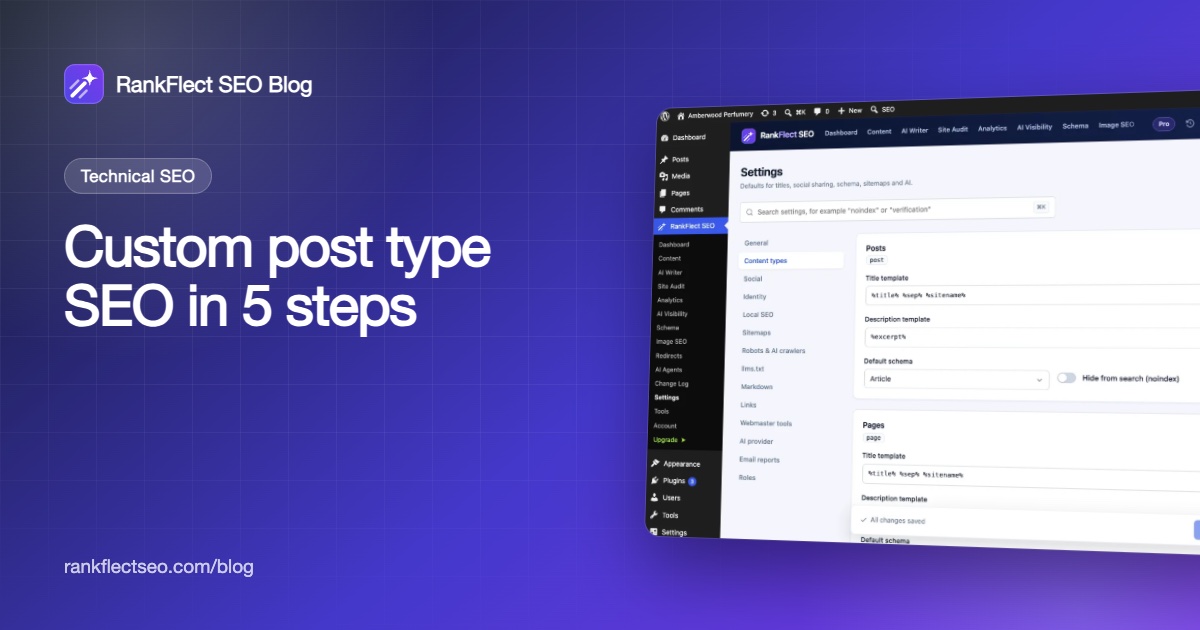
In RankFlect SEO, open Settings → Content types. There's one card per public content type, labelled with its internal name (such as post or recipe).
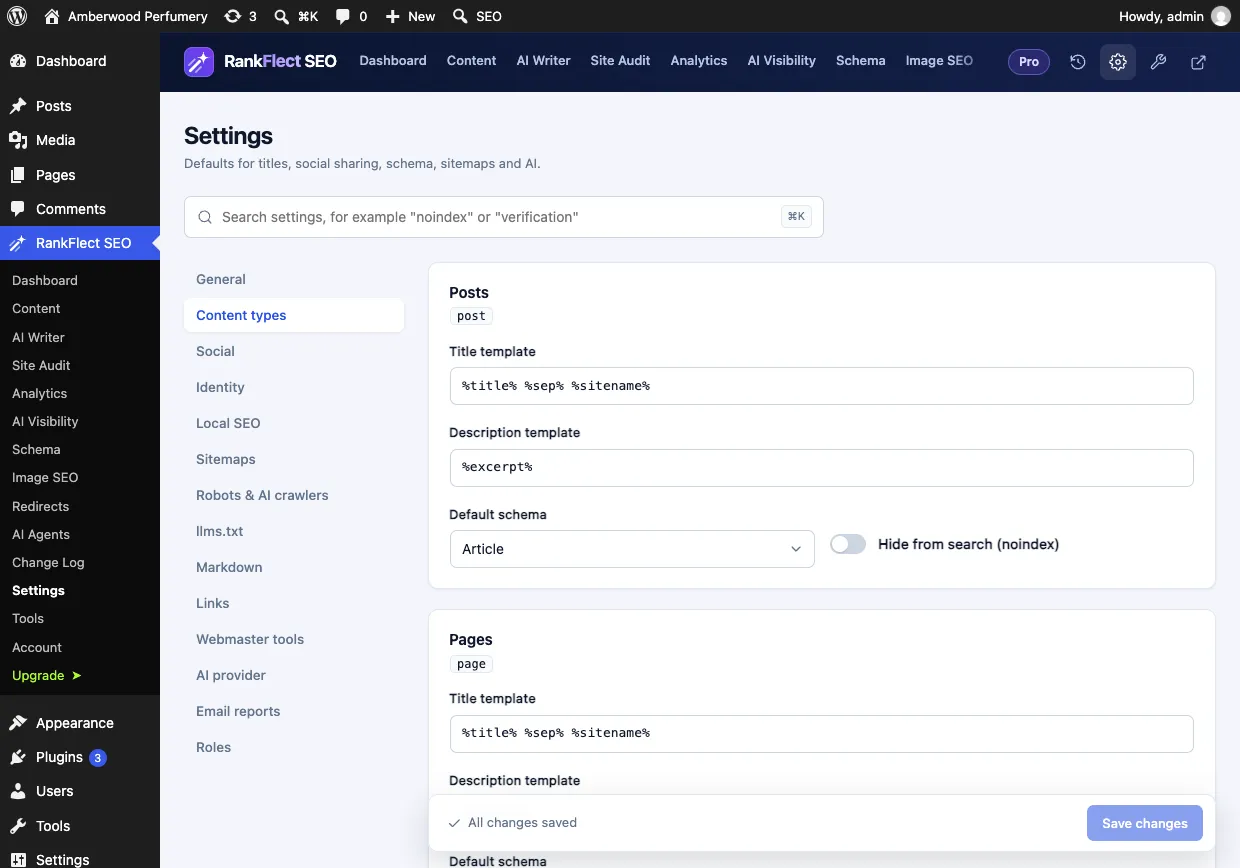
Each card has a Title template, a Description template, a Default schema and the Hide from search (noindex) switch. For a recipe type, a template like this adds a keyword people search for:
Title template:        %title% Recipe %sep% %sitename%
Description template:  %excerpt%
%excerpt% uses the item's excerpt, or the first 155 characters of the content, which is why adding excerpt support at registration helps. Every variable is listed in Title and description variables. A custom SEO title written on an item in the editor always wins over the template. The full settings reference is in Settings for posts, pages and custom post types.
Don't forget the archive page
The post type archive (/recipes/) is often the best page to rank for a broad term like "vegetarian recipes". In RankFlect SEO, post type archives use the template %pt_plural% %sep% %sitename% by default, where %pt_plural% is the plural name of the post type. Give the archive some introductory text if your theme allows it, so it's more than a list of links.
Step 4: Add the right schema to custom post types
Structured data tells search engines what kind of thing each item is. Choose a type that matches the content honestly: a recipe is a Recipe, an event is an Event, a course is a Course.
RankFlect SEO outputs a connected JSON-LD graph on every page, including CPT items (How RankFlect SEO's schema works). You control the main type in two places:
- Per content type: the Default schema on the content type's card. Out of the box, posts use Article, WooCommerce products use Product and everything else, including custom post types, uses Web page. Options include Article, Blog post, News article, Product, Item page, Collection page and more.
- Per item: the Schema section of the RankFlect SEO panel in the editor, where you can pick another page type or add a rich result type such as Recipe, Event or Course in the Schema manager.
Schema for hundreds of items at once
Adding Recipe schema item by item doesn't scale. In RankFlect SEO Pro, schema templates let you write schema once and apply it to every item that matches a set of display conditions, such as Post types set to Recipes. Fields can be filled from custom fields with variables like %cf:cook_time%, read from ACF, Meta Box, Pods or ACPT. New items get the schema automatically.
Whatever method you use, check the result with Google's Rich Results Test or RankFlect SEO's schema validator before rolling it out widely.
Step 5: Check sitemaps, breadcrumbs and internal links
XML sitemap
Public custom post types are included in WordPress sitemaps, each with its own child sitemap such as /wp-sitemap-posts-recipe-1.xml. In RankFlect SEO, each content type has its own switch under Settings → Sitemaps → Include content types, and noindexed types are left out automatically. See XML sitemaps.
Breadcrumbs
Breadcrumbs show where an item sits and give Google a trail to show in results. For a CPT item, RankFlect SEO builds the trail as Home › post type archive (if it has one) › parent items › item, and adds matching BreadcrumbList schema. That's another reason to set has_archive. See Breadcrumbs.
Taxonomies and internal links
CPT items are often orphans: they're linked from their archive page and nowhere else. Register a custom taxonomy (cuisine, event type, course level) so items are grouped into crawlable archive pages, and link to your best items from related blog posts. Taxonomy archives get their own title templates on the Taxonomies card of the same settings page.
A quick custom post type SEO checklist
publicis true, the slug is readable, andshow_in_restis on.- Internal or thin post types are noindexed or not publicly queryable.
- Each indexed type has its own title and description template.
- The post type archive has a good title and some intro text.
- The default schema fits the content, with rich result types where they apply.
- The type appears in the XML sitemap, and noindexed types don't.
- Items are linked from a taxonomy, the archive and related posts.
- Any slug change is covered by 301 redirects.
To bulk-review titles and descriptions across all content types, the bulk SEO editor lists posts, pages and custom post types in one table with a content type filter. If you'd like to try these settings on your own site, you can download RankFlect SEO free.
Frequently asked questions
Are custom post types bad for SEO?
No. Google doesn't care whether a page is a post, a page or a custom post type; it sees a URL with content. Custom post types often help SEO, because they give structured content its own URLs, templates, archives and schema.
Why doesn't my custom post type show up in my SEO plugin?
Usually because it isn't registered as public, so SEO plugins and sitemaps skip it. If the SEO panel is missing from the editor, check show_in_rest; without it, WordPress uses the classic edit screen, where most SEO plugins show a meta box instead.
Should custom post type archives be indexed?
Index an archive if it's a useful landing page with a clear topic and some text, such as a recipe or course listing. If it's a bare list that duplicates other archives, noindex it or link to a curated page instead.
How do I change a custom post type's URL slug without losing rankings?
Change the rewrite slug, re-save permalinks, then add 301 redirects from the old URLs to the new ones, either one by one or with a single pattern rule (for example from /rcp_item/ to /recipes/) if your redirect tool supports pattern matching. Update internal links and resubmit your sitemap in Search Console.
Can I use different schema for different custom post types?
Yes. Set a default schema per content type, override it on individual items, and add rich result types such as Recipe or Event where they apply. Templates that apply schema to every matching item are available in RankFlect SEO Pro.
- #custom post types
- #wordpress seo
- #technical seo
- #schema
- #cpt
Written by
RankFlect SEO TeamThe people who build RankFlect SEO, the WordPress SEO plugin with a built-in MCP server. We write about what we learn shipping SEO tools for AI search.
All articles →Let AI agents fix your SEO. You keep the undo button.
RankFlect SEO is free for unlimited sites, with a built-in MCP server, approval for every change and no AI credits.