ChatGPT vs Claude for SEO (and Gemini): Which AI Fits Which Job
A documented-features comparison of Claude, ChatGPT and Gemini for WordPress SEO: MCP connections, context windows, web and image input, and which fits which job.
In this article
- Key takeaways
- How we compared them
- Claude for SEO
- ChatGPT for SEO
- Gemini for SEO
- Side by side: what each documents today
- Which AI fits which SEO job
- Ongoing work on your WordPress SEO
- Analysing big exports
- Research and competitor reading
- Alt text from images
- Drafting content
- The agent and the AI provider are separate choices
- Safety does not depend on which AI you pick
- Frequently asked questions
- Is ChatGPT or Claude better for SEO?
- Can Gemini connect to my WordPress site?
- Do I need a paid plan to connect Claude to WordPress?
- Can I use more than one AI on the same site?
- Which AI is best for writing alt text?
ChatGPT vs Claude for SEO, with Gemini as the third option, is less about which model writes better and more about which one can connect to your WordPress site, read what you give it and fit the job in front of you. All three can draft, summarise and research. They differ in how they connect to a site over MCP, how much text they handle at once and where they run. This guide compares what each vendor documents today and suggests which AI to use for which SEO task.
Key takeaways
- This is a comparison of documented features at the time of writing, not a head-to-head test of output quality.
- Claude supports custom MCP connectors on every plan, including one on the free plan, and Claude Code or Claude Desktop can reach local and staging sites.
- ChatGPT supports custom MCP servers with read and write tools; OpenAI's docs say account and workspace policies apply.
- Google documents MCP for Gemini Enterprise and its command-line tools. We found no Google help page for adding your own MCP server in the consumer Gemini app.
- Claude's newer models and Gemini on Google AI Pro or Ultra both document a 1 million token context window, useful for large exports.
- Your safety comes from the WordPress side: scoped access, approval and undo apply whichever AI you connect.
How we compared them
We did not run a benchmark, and we are not claiming one model writes better titles than another. Model versions change every few months, and quality depends heavily on your prompt and your content. Instead, this article compares what Anthropic, OpenAI and Google document about the features that matter for SEO work on WordPress:
- Connecting to your site. Can the AI call tools on WordPress through the Model Context Protocol (MCP), and from which app?
- Context size. How much text (a Search Console export, a long post, a crawl list) can it consider at once?
- Web access. Can it look things up on the live web?
- Image understanding. Can it look at an image, for example to write alt text?
Plans and limits change often, so check each vendor's page before you buy anything.
Claude for SEO
Connecting to WordPress. Anthropic's custom connector guide says remote MCP connectors are available on Free, Pro, Max, Ultra, Team and Enterprise plans, with free users limited to one custom connector. Connectors can sign in with OAuth. The server must be reachable from the public internet. For a local or staging site, Claude Code and Claude Desktop run on your computer and connect with a token; our Claude to WordPress guide walks through each.
Context. Anthropic's help centre says its newer chat models, including Opus 5.5, Sonnet 5.5 and Haiku 5.5, have a 1 million token context window, and that other models have 200K.
Web and images. Claude can search the web (workspace admins on Team and Enterprise must enable it) and read images you upload.
Worth knowing. The same Anthropic guide warns that malicious MCP servers may include hidden instructions, and advises approving "Allow always" only for tools you trust to run unsupervised. Connect only servers you trust.
ChatGPT for SEO
Connecting to WordPress. ChatGPT's developer mode gives full MCP client support for read and write tools. OpenAI's guide to connecting a server to ChatGPT describes adding a custom MCP server by URL; the server needs a public HTTPS endpoint with Streamable HTTP. It also notes that account and workspace policies apply, so a Business or Enterprise admin may control access. OpenAI's documentation says ChatGPT treats tools without a read-only hint as write actions and asks for confirmation depending on the app's permissions and the action. Menu names have changed over time, so follow the current OpenAI page.
Context, web and images. ChatGPT can search the web and analyse uploaded images and files. OpenAI says tool availability depends on your subscription and settings, and context limits vary by model and plan, so check its help centre for your plan.
Gemini for SEO
Connecting to WordPress. Google's MCP documentation covers business and developer tools:
- Gemini Enterprise (Business edition): a team admin can add a custom MCP server. Google's help page marks this as pre-GA and says only the Streamable HTTP transport is supported.
- Command-line tools: the Gemini CLI repository says that from June 18, 2026, free individual access and Google AI Pro and Ultra plans moved to Antigravity CLI, while Gemini CLI serves Gemini Code Assist users. Both read MCP servers from a config file.
At the time of writing we could not find a Google help page that explains adding your own MCP server URL in the consumer Gemini app, so we don't list it as an option here.
Context, web and images. Google's file upload help page says Google AI Pro and Ultra get a 1 million token context window (about 1,500 pages of text, by Google's estimate) and that Gemini Apps accept documents, spreadsheets and photos. Gemini can also draw on Google Search in its answers.
Side by side: what each documents today
- Remote MCP connector in the main chat app: Claude (all plans, one on Free) and ChatGPT (developer mode, subject to plan and workspace policy). Gemini: Enterprise Business edition, set up by an admin.
- Local or staging WordPress site: Claude Code and Claude Desktop, ChatGPT's developer tooling via a tunnel, or Gemini's command-line tools. Web apps need a public HTTPS site.
- Very large inputs: Claude's newer models and Gemini on AI Pro or Ultra both document 1 million tokens.
- Web search and image input: all three, with limits that depend on plan.
Which AI fits which SEO job
Ongoing work on your WordPress SEO
Meta descriptions, alt text, audit fixes, redirects: this needs an AI that can call tools on your site. Claude and ChatGPT both connect to a WordPress MCP server from their main apps, and Claude's free plan allows one custom connector, which is enough to try it. If your site is local or staging, use a desktop or terminal client such as Claude Code.
Analysing big exports
A year of Search Console queries, a crawl of thousands of URLs or a long content inventory benefits from a large context window. Claude's newer models and Gemini on a paid Google AI plan both document 1 million tokens. Even then, ask for counts and groupings you can check, not just a summary.
Research and competitor reading
All three can browse. Gemini's link to Google Search is handy for quick fact checks, but no assistant can see your real rankings. Use Search Console for that, and treat any "you rank #3" claim from a chatbot as unverified. Our Search Console setup guide covers connecting it to WordPress.
Alt text from images
All three can read images when you upload them. When an agent works through a WordPress MCP server, though, it usually sees image records, not pixels. In RankFlect SEO, the ai_suggest_alt tool sends the image to the AI provider you set in the plugin, and Anthropic, OpenAI and Gemini models there are all listed as reading images. See image SEO and AI alt text.
Drafting content
Any of them can draft. What matters more is a clear brief, your own experience and facts in the piece, and a human edit before publishing. Pick the one whose writing you need to edit least, judged on your own content.
The agent and the AI provider are separate choices
In RankFlect SEO, two different AIs can be involved, and you can mix them:
- The agent is the assistant you chat with, such as Claude, ChatGPT or a Gemini-based CLI. It decides which tools to call. Its reasoning runs on its own service.
- The AI provider is the key you add in RankFlect SEO → Settings → AI provider: Anthropic, OpenAI, Google Gemini, OpenRouter or a local model. Tools whose names start with
ai_, such asai_suggest_metaandai_write_draft, use it and count toward your daily request limit. See add your AI provider key.
So you can talk to Claude in claude.ai while a cheaper Gemini or OpenAI model writes alt text through the plugin, or use one vendor for both.
Safety does not depend on which AI you pick
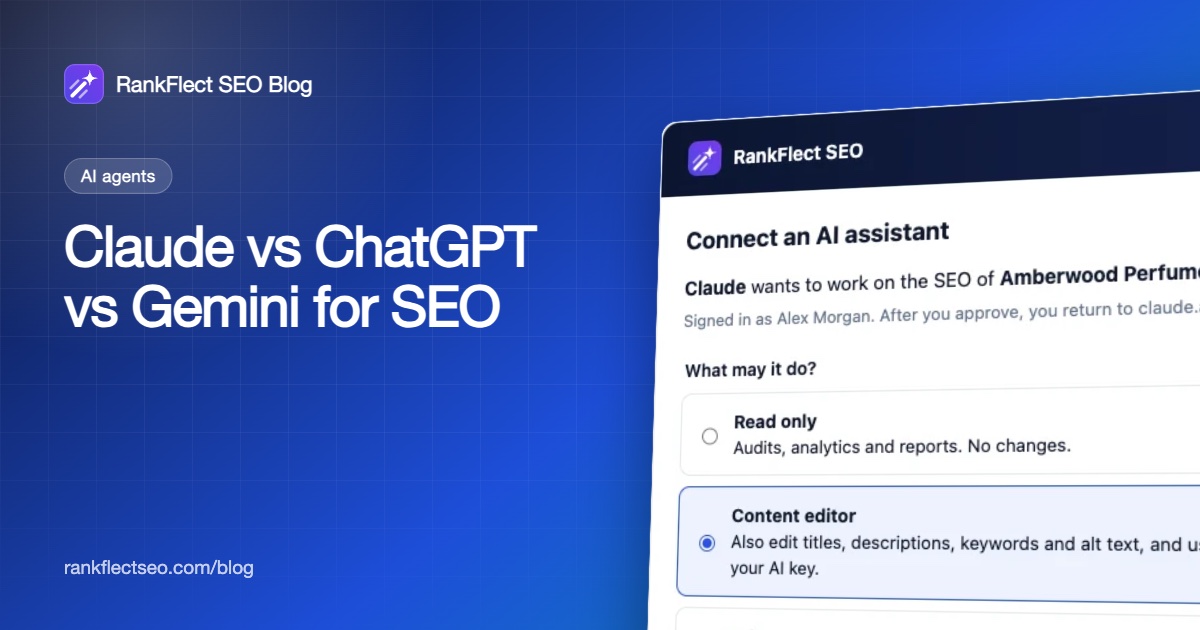
Any of these assistants can make a wrong edit or be misled by text it reads. The protection belongs on the WordPress side. When claude.ai or ChatGPT connects to RankFlect SEO, an administrator approves it on a consent screen and picks Read only, Content editor or Full access.
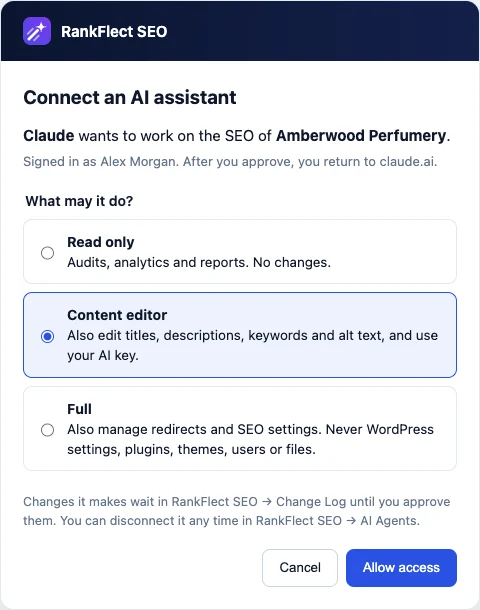
By default, the assistant's changes then wait in the Change Log until you approve them, and every applied change can be reverted. That works the same for Claude, ChatGPT or any other MCP client. Details: connect claude.ai or ChatGPT and approval mode, dry runs and undo. The connector is free in RankFlect SEO, which you can download free.
Frequently asked questions
Is ChatGPT or Claude better for SEO?
Neither is better for every task, and we have not tested them head to head. Both can connect to a WordPress MCP server and both handle research and drafting. Try the same task on your own content with each and keep the one whose output needs the least editing.
Can Gemini connect to my WordPress site?
Through Google's documented routes: Gemini Enterprise (admin-configured MCP servers, pre-GA) or Google's command-line tools, which read MCP servers from a config file. We could not find documentation for adding a custom MCP server in the consumer Gemini app at the time of writing.
Do I need a paid plan to connect Claude to WordPress?
No. Anthropic says free users can add one custom connector. Paid plans add more connectors and higher usage limits.
Can I use more than one AI on the same site?
Yes. Give each assistant its own connection or token, so the Change Log shows who did what and you can revoke one without affecting the others.
Which AI is best for writing alt text?
All three can read images. In practice, alt text written through a WordPress plugin uses the AI provider key set in that plugin, so choose a model that reads images and fits your budget, and review the results for product names and people.
- #chatgpt
- #claude
- #gemini
- #ai seo
- #mcp
Written by
RankFlect SEO TeamThe people who build RankFlect SEO, the WordPress SEO plugin with a built-in MCP server. We write about what we learn shipping SEO tools for AI search.
All articles →Let AI agents fix your SEO. You keep the undo button.
RankFlect SEO is free for unlimited sites, with a built-in MCP server, approval for every change and no AI credits.