AI Meta Description Generator: Write Snippets That Get Clicks
What makes a meta description earn clicks, a prompt you can reuse with any AI tool, and how to generate and review descriptions in WordPress.
In this article
- Key takeaways
- What a meta description does (and doesn't do)
- What a good meta description looks like
- A reusable prompt for any AI meta description generator
- How to review AI-generated meta descriptions
- Generate meta descriptions with AI in WordPress
- One page at a time (free)
- Many pages from one table (free, one row at a time)
- Whole batches with Bulk AI (Pro)
- Costs and privacy
- Measure whether new descriptions work
- Frequently asked questions
- Are AI-generated meta descriptions bad for SEO?
- How long should a meta description be?
- Why does Google ignore my meta description?
- Should every page have a meta description?
- Can AI write meta descriptions for WooCommerce products?
An AI meta description generator reads your page and writes the short summary that can appear under your title in Google results. Used well, it saves hours on large sites and fills the gaps left by migrations and templates; used carelessly, it produces vague, duplicate snippets that nobody clicks. This guide covers what makes a meta description work, a prompt you can reuse with any AI tool, how to review the output, and how to generate descriptions one page at a time or in bulk inside WordPress.
Key takeaways
- Google mostly builds snippets from page content, and uses your meta description when it describes the page better. A good description raises the chance it's shown.
- There is no official length limit, but long descriptions are cut to fit the screen. Aim for roughly 130 to 155 characters and check the pixel width.
- Every page needs its own description. Duplicates and keyword lists don't help.
- Google explicitly allows programmatically generated descriptions on large sites, as long as they are readable and page-specific.
- Always review AI output: check facts, the promise to the reader and the length before you save.
What a meta description does (and doesn't do)
The meta description is an HTML tag in the page head. It isn't a ranking factor in itself, but it influences whether people click. Google's snippet documentation explains the key points:
- Google primarily creates snippets from the page content, and may use the meta description when it gives a more accurate description of the page.
- There's no limit on how long a meta description can be, but snippets are truncated as needed, typically to fit the device width.
- Identical or similar descriptions on every page aren't helpful. Descriptions that are just lists of keywords are less likely to be shown.
- For large, database-driven sites, generating descriptions programmatically is appropriate and encouraged, as long as they are human-readable and diverse.
That last point is why an AI meta description generator makes sense. It is the modern version of programmatic generation, but it reads each page instead of filling a template.
What a good meta description looks like
Whether a person or an AI writes it, a description that earns clicks usually has these traits:
- It matches the search intent. Someone searching "how to" wants steps; someone searching "best" wants a comparison. Say which one the page gives them.
- It includes the main keyword naturally. Google often bolds words that match the query, which draws the eye.
- It's specific. Name the number of steps, the product, the outcome or the audience. "Learn more about our services" says nothing.
- It's accurate. It promises only what the page delivers.
- It fits. Put the most important words first so a cut-off still makes sense.
- It's unique. No two pages share the same description.
Compare two descriptions for a recipe page:
Weak: "Welcome to our website. We have many delicious recipes for you to try. Read more here."
Better: "Make crisp mango pickle at home in 30 minutes with 6 pantry spices. Step-by-step photos, storage tips and how to keep it fresh for months."
The second one only works if the page really has those details. That's the rule an AI generator must follow too.
A reusable prompt for any AI meta description generator
If you use a general AI chat tool, give it the page content and clear rules. A prompt like this works well:
Write 3 meta descriptions for the page below.
Rules:
- 130 to 155 characters each, counting spaces.
- Include the keyword "[focus keyword]" once, near the start, naturally.
- Say what the reader gets from this page and why it is worth the click.
- Use only facts that appear in the page text. No made-up numbers or claims.
- Plain, active language. No clickbait, no all caps, no emoji.
- Do not repeat the page title word for word.

Page title: [title]
Page text: [paste the main content]
Ask for three options and pick the best one. Variety helps you spot when the model has misunderstood the page.
How to review AI-generated meta descriptions
Google's guidance on using generative AI content says titles, meta descriptions and other metadata need the same review as page content, because they appear in search results. Before you save a description, check:
- Facts: every number, price, feature and claim is on the page.
- Intent: it answers what the searcher wants, not just what the page is about.
- Length: it isn't cut off mid-thought on mobile.
- Uniqueness: no other page on your site uses the same or a near-identical description.
- Tone: it sounds like your brand, not like a generic ad.
- Keyword stuffing: the keyword appears once, naturally.
For product pages, use details that differ between products: material, size, use case, compatibility. Shared marketing phrases across a catalogue create near-duplicates.
Generate meta descriptions with AI in WordPress
Copying content into a chat tool and pasting descriptions back works for a few pages. For a whole site, it's faster to generate them where the content lives. RankFlect SEO, a WordPress SEO plugin, does this with your own AI provider key: you choose Anthropic Claude, OpenAI, Google Gemini, OpenRouter, a local model through an OpenAI-compatible server, or on WordPress 7.0 and later the site's WordPress AI connection. There are no credits; your provider bills you directly. See Add your AI provider key.
One page at a time (free)
- Open a post in the block editor and click the RankFlect SEO button in the toolbar.
- In General, under Meta Description, click Suggest with AI. You get three descriptions of 130 to 155 characters to choose from, and you can still edit the one you pick.
- Save the post. Suggestions read the saved content, so save a new post once before you ask.
To fill the SEO title, meta description and focus keywords in one request, use Generate with AI in the AI Assistant card under Analysis. You choose the content type and tone first. See AI assistant in the editor.
Many pages from one table (free, one row at a time)
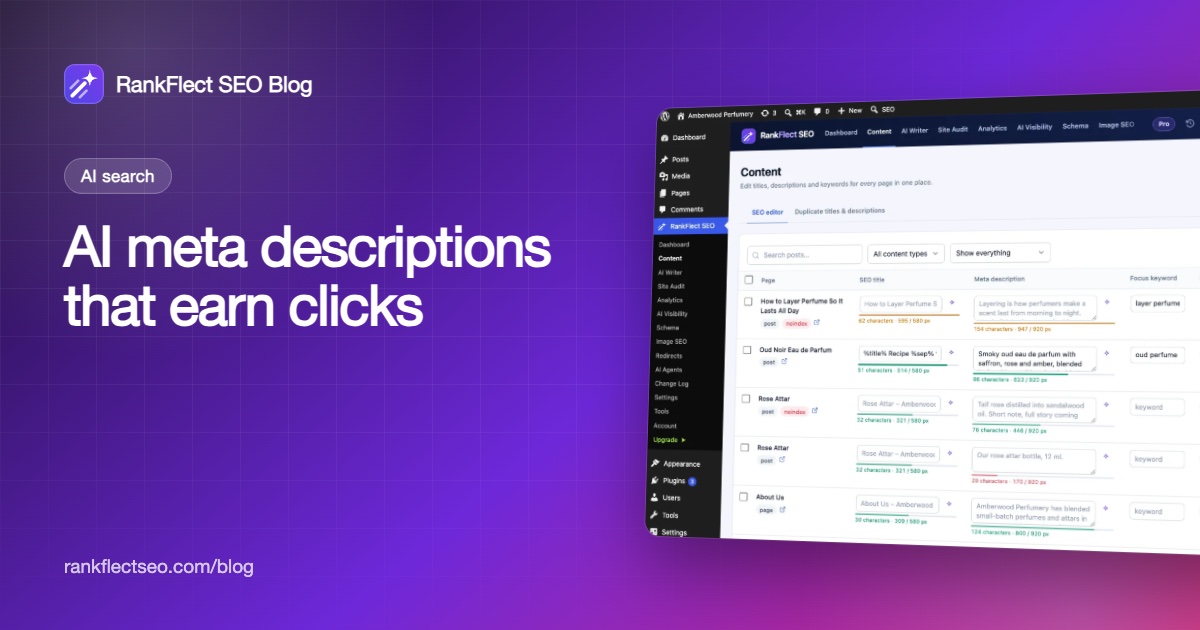
Go to RankFlect SEO → Content and open the SEO editor tab. Filter by Missing description, then click the sparkle icon next to a description to see three AI options for that post, pick one and save. Every save is recorded in the Change Log. Details are in the bulk SEO editor.
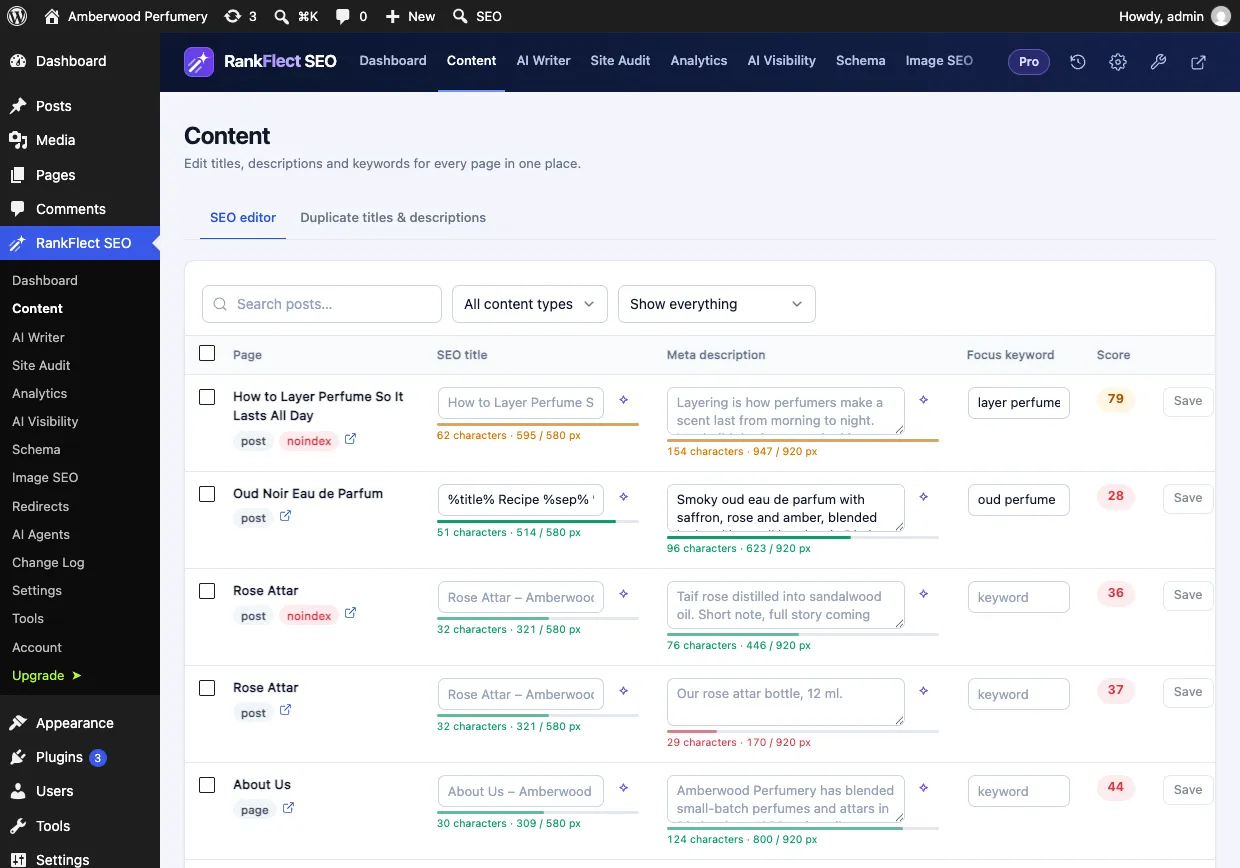
Each title and description shows a length bar measured in pixels, the way Google cuts them, so you can see at a glance which ones run too long or too short.
Whole batches with Bulk AI (Pro)
In RankFlect SEO Pro, select up to 50 posts in the SEO editor and click AI descriptions. For each post, the AI reads its title and content and writes a description of 130 to 155 characters, with the main focus keyword near the start when one is set. The site audit's Fix with AI button does the same for issues such as missing, duplicate, too-long or too-short descriptions, up to 20 items per run.
Bulk AI replaces any description already saved on the selected posts, so filter by Missing description first if you only want to fill gaps. RankFlect SEO takes a backup before each run and records the whole run as one batch in the Change Log, where Revert whole batch undoes it. Full steps: Bulk AI titles and descriptions.
RankFlect SEO Pro can also write a missing SEO title or description automatically a few seconds after a post is published, with Write missing metadata when a post is published in the AI provider settings.
Costs and privacy
Each suggestion or generated description is one request to your provider, and bulk runs use one request per post. All requests count toward the Daily request limit (200 by default). A description request sends the post title, up to 6,000 characters of the post's text, the focus keyword, the site name and your writing tone, only to the provider you selected. See AI usage limits, costs and privacy.
Measure whether new descriptions work
A description is only better if more people click. After updating descriptions:
- Note the date of the change.
- In Google Search Console, compare the click-through rate of the page for the four weeks before and after, at a similar average position.
- Check which snippet Google actually shows by searching the main query. If Google still uses page text, your description may not match the query well enough.
- Start with pages on page one that have many impressions and a low CTR. They gain the most from a better snippet.
Our guide to Google Search Console for WordPress shows where to find those numbers. To try AI descriptions on your own site, download RankFlect SEO free and add your provider key.
Frequently asked questions
Are AI-generated meta descriptions bad for SEO?
No. Google judges content by quality, not by how it was made, and it encourages programmatic descriptions on large sites as long as they are readable and specific to each page. Review the output for accuracy and uniqueness before you save it.
How long should a meta description be?
Google sets no character limit, but it truncates snippets to fit the screen. Around 130 to 155 characters is a practical target for most pages, with the key information first.
Why does Google ignore my meta description?
Google picks the snippet that best matches each query, so it may use text from your page instead. This happens more when the description is vague, duplicated or doesn't match the query. A specific, page-specific description is more likely to be shown.
Should every page have a meta description?
Every page you want people to find in search should. For pages you can't write by hand, an AI generator or a good template is better than an empty field or a duplicate.
Can AI write meta descriptions for WooCommerce products?
Yes. Give the generator the product's real details so each description is unique. If you also submit product data to Google Merchant Center, note that Google requires AI-generated product titles and descriptions there to be labelled as AI-generated.
- #meta description
- #ai seo
- #bulk seo
- #wordpress seo
- #click-through rate
Written by
RankFlect SEO TeamThe people who build RankFlect SEO, the WordPress SEO plugin with a built-in MCP server. We write about what we learn shipping SEO tools for AI search.
All articles →Let AI agents fix your SEO. You keep the undo button.
RankFlect SEO is free for unlimited sites, with a built-in MCP server, approval for every change and no AI credits.