AI Blog Writer for WordPress: How to Choose One and Use It Well
What Google says about AI content, how WordPress AI writers differ, and a brief-first workflow that turns AI drafts into posts worth ranking.
In this article
- Key takeaways
- What Google says about AI-written blog posts
- Four kinds of AI blog writers for WordPress
- What to look for in an AI blog writer for WordPress
- A workflow that produces posts worth ranking
- How RankFlect SEO's AI blog writer works
- Step 1: Add your AI provider
- Step 2: Create a content brief
- Step 3: Write the draft
- Or write inside the post you're editing
- What an AI blog post costs
- Frequently asked questions
- Will Google penalise AI-written blog posts?
- Can an AI blog writer publish posts automatically?
- Which AI model is best for writing blog posts?
- How long should an AI-written blog post be?
- Do I need to disclose that AI helped write a post?
The best AI blog writer for WordPress plans the article before it writes, works inside your WordPress admin, saves the result as a draft instead of publishing it, and lets you choose the AI model and pay for it directly. Google doesn't penalise content because AI helped write it; it penalises content that is unhelpful or mass-produced to manipulate rankings. This guide shows how to choose an AI writer, how to set it up, and a workflow that turns AI drafts into posts worth ranking.
Key takeaways
- Google judges content by its quality, not by how it was produced. Mass-producing pages with little value can break its spam policies.
- Choose a writer that starts from a brief: search intent, an outline, the questions readers ask and internal links.
- Drafts should land in WordPress as drafts, never auto-published.
- Bring-your-own-key tools let you pick the provider and pay it directly, with no credit packs.
- Budget real editing time for facts, first-hand experience, images and examples.
What Google says about AI-written blog posts
Google's position is clear. In its post on Google Search and AI-generated content, it says it focuses on the quality of content rather than how it is produced. Using automation mainly to manipulate rankings is spam, whether a person or a machine produced it.
Its guidance on using generative AI content adds practical rules for site owners:
- Fact-check and review AI-generated content before publishing, because models can produce errors.
- Generating many pages without adding value for users may count as scaled content abuse.
- Titles, meta descriptions, structured data and alt text deserve the same review, because they appear in search results.
- Consider telling readers how content was created when they would reasonably wonder.
So the question isn't "Can I use AI?" It's "Does this post help a reader more than what already ranks?" A good AI blog writer makes that easier; a bad one makes it easy to publish a hundred posts nobody needs.
Four kinds of AI blog writers for WordPress
Tools fall into four groups. Each has trade-offs.
- A chat assistant plus copy and paste. You prompt a general AI chat tool and paste the output into WordPress. It's flexible, but formatting breaks, internal links are guesswork and the SEO fields stay empty.
- Standalone AI writing platforms. They often add SEO scoring and publish to WordPress through an integration. They usually run on a subscription or credits, and your content plan lives outside your site.
- WordPress plugins that sell AI credits. Writing happens in wp-admin, but the plugin vendor sits between you and the AI model and decides the price per word or per request.
- WordPress plugins that use your own provider key. You paste a key from a provider such as Anthropic, OpenAI or Google, and requests go from your site straight to that provider. You pay the provider's prices with no markup, and you can switch models.
WordPress itself is moving toward the fourth model. WordPress 7.0 introduced a Connectors API and a Settings → Connectors screen, where a site can store one AI connection for plugins to share.
What to look for in an AI blog writer for WordPress
Use this checklist when you compare tools.
- Brief first, draft second. The writer should identify search intent, propose an outline and list the questions to answer before writing. You should be able to review the plan.
- Knows your site. It should look at your existing posts to suggest internal links and avoid writing what you already have.
- Clean WordPress output. Real headings, paragraphs and lists as blocks, not one giant pasted block of text.
- SEO fields filled in. A meta description and focus keyword saved with the draft.
- FAQ with schema. Questions and answers at the end, output as FAQ structured data.
- Draft only. Nothing publishes without a person.
- Your choice of model and cost control. A daily cap on requests protects you from surprise bills.
- Clear privacy. You should know exactly what is sent and where.
- Your language and tone. It should write in your site's language and follow a house tone.
A workflow that produces posts worth ranking
Whatever tool you use, follow the same steps.
- Pick a topic with a real searcher. Start from a question your customers ask, a query from Search Console, or a gap in your content. Search it and read the top results.
- Review the brief. Check that the intent is right. A searcher who wants a comparison won't be satisfied by a definition. Remove sections that don't serve the reader.
- Add notes only you can give. Your prices, products, process, mistakes you've seen, results from your own tests. This is what separates your post from every other AI draft.
- Generate the draft. Treat it as a first version, not a finished post.
- Fact-check every claim. Numbers, dates, product details, steps and quotes. Delete anything you can't verify.
- Add experience and evidence. Screenshots, photos, examples, a short story from your work. Google's quality guidance values first-hand experience.
- Edit for voice and length. Cut filler intros and repeated points. Shorter and specific beats longer and generic.
- Check the SEO basics. Title, meta description, one H1, logical H2s, internal links, alt text.
- Publish, then measure. Watch impressions and clicks in Search Console over the next weeks and update the post as you learn.
Publish at the pace you can edit properly. One reviewed post a week does more for a site than a batch of thin ones.
How RankFlect SEO's AI blog writer works
RankFlect SEO includes an AI writer in its free version. It uses your own AI provider key: there is no RankFlect SEO account, no credits and no markup. You pay your provider at their prices, or nothing with a local model.
Step 1: Add your AI provider
Go to RankFlect SEO → Settings → AI provider, choose a provider, paste your API key, pick a model and click Save and test connection. The supported options are Anthropic Claude, OpenAI, Google Gemini, OpenRouter, any OpenAI-compatible server (such as Ollama or LM Studio for a local model) and, on WordPress 7.0 and later, the site's WordPress AI connection. Details for each are in Add your AI provider key.
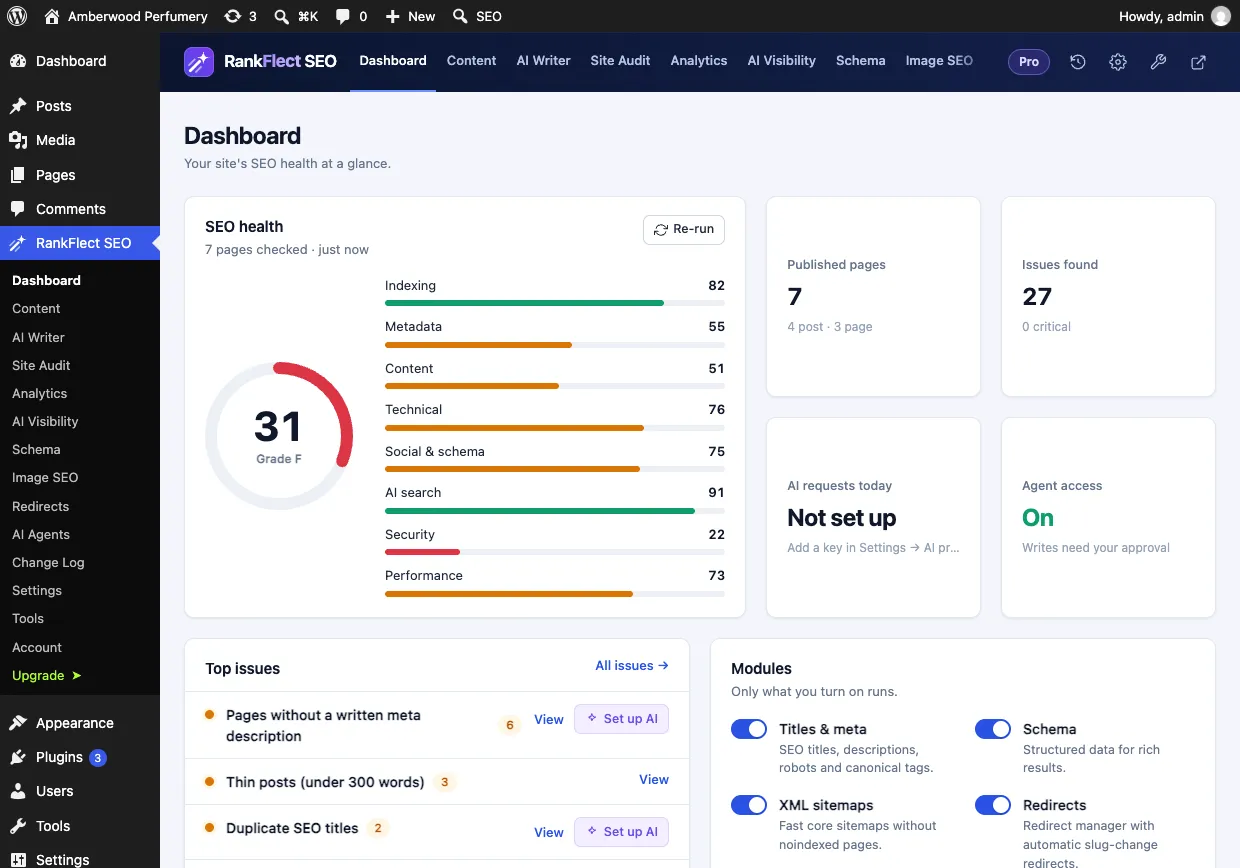
Until a key is added, the Dashboard's AI requests today tile shows "Not set up". Once AI is working, the same tile counts requests against your Daily request limit.
Step 2: Create a content brief
Open RankFlect SEO → AI Writer, enter a target keyword or topic, optionally add the audience and notes for the writer, and click Create brief. RankFlect SEO sends the titles of related posts on your site along with the request, so the brief can suggest internal links and spot gaps.
The brief contains the search intent, the audience, a meta description, an outline of 5 to 8 H2 sections, questions to answer, content gaps on your site, entities to cover and up to five internal links with anchor text. It also recommends a length between 600 and 3,000 words.
Step 3: Write the draft
Choose the content type, leave Add an FAQ section on if you want one, and click Write article draft. The writer works section by section, which takes a minute or two. The result is saved as a WordPress draft, converted to blocks, with a title, slug, excerpt, meta description and focus keyword. The FAQ section is built from Details blocks, which RankFlect SEO outputs as FAQ schema.
Nothing is published. The AI is instructed not to invent statistics, prices, quotes or first-hand experience, but you should still check every fact. Full steps are in AI writer: briefs and drafts.
Or write inside the post you're editing
If you've already started a post, open the RankFlect SEO panel in the block editor and choose Write with AI. Set the topic, audience, tone and length (about 800, 1,500 or 2,500 words), then review the article and insert it, add it to the end, or replace the content. See Write a post with AI in the editor. The panel's AI assistant can also generate the SEO title and description or review your content with a quality score.
What an AI blog post costs
With a bring-your-own-key tool, cost depends on your provider's prices and how many requests a post uses. In RankFlect SEO, a brief is one request, and a draft uses one request for the opening and FAQ plus one for every three outline sections. A brief with six sections therefore uses four requests in total.
Every request counts toward the Daily request limit (200 by default), which resets at midnight UTC, and Pause all AI stops every request at once. For a brief or draft, RankFlect SEO sends the topic, keyword, your notes and audience, and the titles of related posts, only to the provider you chose. Your API key stays in your WordPress database and is never included in exports. See AI usage limits, costs and privacy.
Connected AI agents can create briefs and drafts through the same writer, and they never publish them. If you work that way, read our guide to an AI SEO agent for WordPress.
Want to try it on your own site? Download RankFlect SEO free, add a key and write your first brief.
Frequently asked questions
Will Google penalise AI-written blog posts?
Not for using AI. Google says it rewards helpful content however it is produced, and treats content made mainly to manipulate rankings as spam. Review, fact-check and add real value to every post, and avoid publishing at a scale you can't edit.
Can an AI blog writer publish posts automatically?
Some tools can, but it's safer not to. Automatic publishing skips the fact-checking and experience that make a post worth ranking. RankFlect SEO saves AI articles as drafts or inserts them into the editor; you publish them yourself.
Which AI model is best for writing blog posts?
Use the provider you already have an account with and test a couple of its models on the same brief. Larger models usually write better long-form text but cost more per request. A local model through Ollama costs nothing to run, but quality depends on the model and your hardware.
How long should an AI-written blog post be?
As long as the topic needs and no longer. Look at what ranks for your keyword, cover the questions searchers ask, and cut repetition. RankFlect SEO's brief recommends a length based on the topic, between 600 and 3,000 words.
Do I need to disclose that AI helped write a post?
Google doesn't require a label for text, but it encourages explaining how content was created when readers would wonder. A short note on your editorial process is a good habit. Some platforms, such as Google Merchant Center for product data, have their own labelling rules.
- #ai writer
- #ai content
- #wordpress ai
- #blog writing
- #content brief
Written by
RankFlect SEO TeamThe people who build RankFlect SEO, the WordPress SEO plugin with a built-in MCP server. We write about what we learn shipping SEO tools for AI search.
All articles →Let AI agents fix your SEO. You keep the undo button.
RankFlect SEO is free for unlimited sites, with a built-in MCP server, approval for every change and no AI credits.