llms.txt for WordPress: What It Does, What It Doesn't, How to Add It
What llms.txt is, what it can and can't do for your WordPress site, and three ways to add it, with checks and common mistakes.
In this article
- Key takeaways
- What is llms.txt?
- What llms.txt does not do
- The llms.txt format
- Three ways to add llms.txt to WordPress
- Option 1: Upload a file by hand
- Option 2: Use an SEO plugin that generates it
- Option 3: Generate llms.txt and Markdown pages with RankFlect SEO
- How to check your WordPress llms.txt
- Common llms.txt mistakes in WordPress
- Where llms.txt fits in your AI search plan
- Frequently asked questions
- Does llms.txt help SEO?
- Where do I put llms.txt in WordPress?
- What is the difference between llms.txt and robots.txt?
- What is llms-full.txt?
- Should every WordPress site have an llms.txt file?
An llms.txt file is a short Markdown index of your most important pages, served at yoursite.com/llms.txt, that helps AI tools find and read your content. Adding llms.txt to WordPress takes a few minutes, either by uploading a file or with a plugin that keeps it up to date. It is not a Google ranking factor, though, so treat it as a small convenience for AI agents, not an SEO shortcut.
This guide explains what llms.txt does and doesn't do, shows the format, and walks through three ways to add it to a WordPress site.
Key takeaways
- llms.txt is a proposed standard from llmstxt.org: a Markdown file at your site's root that lists key pages with short descriptions.
- Google says you don't need new machine-readable or AI text files to appear in its AI features, and it doesn't use llms.txt for Google Search.
- Public evidence that llms.txt brings more AI citations or traffic is limited. Its clearest use is helping AI agents and coding tools read documentation.
- In WordPress you can upload a file by hand, use an SEO plugin that generates it, or use RankFlect SEO, which also serves Markdown versions of your pages.
- Check that the file returns a 200 status, is plain text, isn't cached with old content and only lists pages you want indexed.
What is llms.txt?
The llms.txt proposal was published by Jeremy Howard in September 2024. Its goal is simple: web pages are full of menus, scripts and ads, and AI models work with limited context. A clean, curated list of your best pages, in Markdown, is easier for them to use.
The proposal also suggests that each page should have a clean Markdown copy at the same URL with .md added. An AI tool can then read your words without your theme's HTML.
Some documentation sites already publish one. For example, the Model Context Protocol docs point AI tools to their own llms.txt index at the top of each page.
What llms.txt does not do
It is worth being clear about the limits before you spend time on it.
- It doesn't affect Google rankings. Google's guide to AI features and your website says: "You don't need to create new machine readable files, AI text files, or markup to appear in these features." Google representatives have also said publicly that Google Search doesn't use llms.txt.
- It isn't a crawl control. llms.txt doesn't block or allow anything. To control which bots read your site, you use robots.txt.
- It isn't proven to win AI citations. Public evidence that llms.txt makes AI assistants cite a site more often is limited. Don't expect a traffic jump from adding it.
So why add one? It costs little, it can help AI agents and tools that do look for it, and it gives you a tidy, curated summary of your site. For documentation, SaaS products and developer tools, where coding assistants read your pages often, it is more useful than on a typical blog.
The llms.txt format
According to llmstxt.org, the file uses Markdown in a fixed order:
- An H1 with the site or project name. This is the only required part.
- A blockquote with a short summary of the site.
- Optional paragraphs or lists with more detail (no headings).
- H2 sections, each containing a list of links. Each item is a Markdown link, optionally followed by a colon and a short note.
- An optional H2 section named "Optional" for secondary links that tools can skip when they need less context.
A small WordPress site might look like this:
# Example Bakery

> Small-batch sourdough and pastries, baked daily in Portland.

## Pages

- [About us](https://example.com/about.md): Who we are and how we bake.
- [Contact](https://example.com/contact.md): Opening hours, address and phone.

## Posts

- [How to feed a sourdough starter](https://example.com/feed-sourdough-starter.md): A daily routine that works.

## Optional

- [Sitemap](https://example.com/wp-sitemap.xml)
The file lives at /llms.txt in your site's root. The proposal also allows files at a subpath, such as /docs/llms.txt.
Three ways to add llms.txt to WordPress
Option 1: Upload a file by hand
This works on any host and needs no plugin.
- Write the file in a plain text editor using the format above. Keep it to your most useful pages.
- Save it as
llms.txtwith UTF-8 encoding. - Upload it to your site's root folder, the same folder that holds
wp-config.php, using SFTP or your host's file manager. - Open
https://yoursite.com/llms.txtin a browser to check that it loads.
The downside is upkeep. A static file doesn't change when you publish, rename or delete posts, so links go stale unless you update it yourself. Also check whether an SEO plugin already serves a virtual llms.txt, because a physical file and a plugin can conflict.
Option 2: Use an SEO plugin that generates it
Several WordPress SEO plugins can now build llms.txt for you from your content. For example, at the time of writing Yoast describes an llms.txt generator in its free plugin. Plugins differ in which pages they include, how often they refresh the file and how much control you get, so read each plugin's documentation.
Whatever you choose, run only one tool that generates llms.txt. Two plugins serving the same URL leads to confusing results.
Option 3: Generate llms.txt and Markdown pages with RankFlect SEO
RankFlect SEO builds llms.txt from your content and also serves a clean Markdown version of each page. Both are on by default in the free plugin.
- Install and activate RankFlect SEO. It is free on WordPress.org.
- Make sure pretty permalinks are on in Settings → Permalinks. The
/llms.txtand.mdaddresses need them. - Go to RankFlect SEO → Settings → llms.txt.
- Write an Introduction: one or two sentences on what the site is about. If you leave it empty, your site tagline is used.
- Under Include, choose the content types to list. Pages and Posts are included by default.
- Set Items per content type (50 by default) and click Save changes.
- On the Markdown tab, keep Serve Markdown versions on.
How the generated file behaves:
- Each line uses the post title and its meta description, so good meta descriptions make a better llms.txt.
- Noindexed and password-protected pages are left out.
- With Markdown pages on, links point at the
.mdversions. - The file is cached for 12 hours and rebuilt when you save a post or change SEO data.
- Markdown pages carry an
X-Robots-Tag: noindexheader, so search engines don't index them as duplicates. - On multilingual sites using Polylang, each language gets its own file at
/<lang>/llms.txt.
RankFlect SEO Pro adds /llms-full.txt, with the full text of your key pages in one file, and an optional AI usage policy section. The full settings are in llms.txt and Markdown pages for AI, and language setup is in multilingual SEO.
How to check your WordPress llms.txt
- Open it in a browser. Visit
https://yoursite.com/llms.txt. You should see plain Markdown text, not your theme or a 404 page. - Check the status and type. Run
curl -I https://yoursite.com/llms.txt. Look for a200status and atext/plainortext/markdowncontent type. - Click a few links. Every link should load, and none should point at drafts, noindexed pages or redirects.
- Check after an update. Edit a post, then reload the file. If nothing changes, a page cache or CDN may be serving an old copy. Purge it for that URL.
- See whether AI bots read it. Your server or CDN logs show requests for
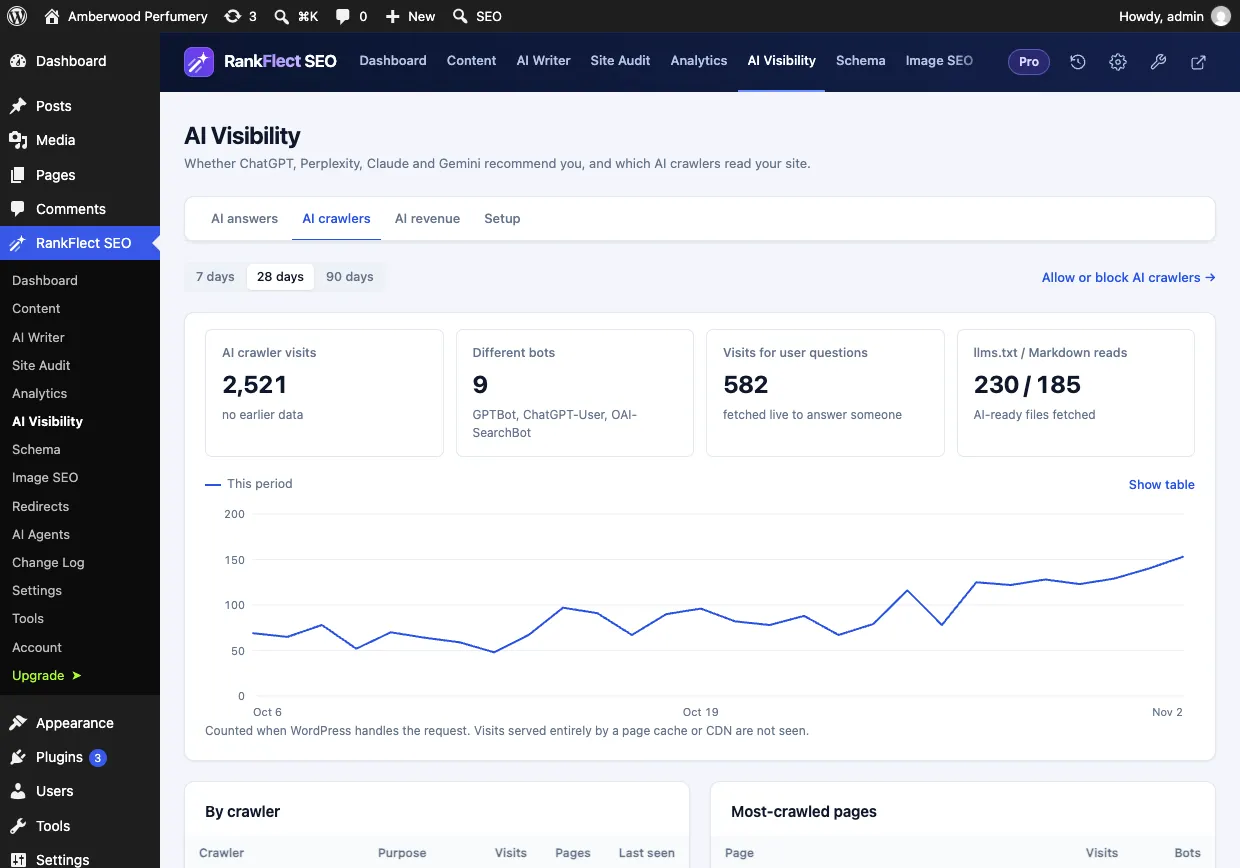
/llms.txt. In RankFlect SEO, the llms.txt / Markdown reads tile on the AI crawlers report counts requests for these files from known AI bots.
Common llms.txt mistakes in WordPress
- Expecting a ranking boost. Google doesn't use llms.txt for Search. Measure it as a convenience for AI tools, not as SEO.
- Treating it as a block list. llms.txt can't stop crawlers. Use robots.txt rules to allow or block specific AI bots. See edit robots.txt.
- Blocking the bots you want to reach. If robots.txt or a security plugin blocks AI search crawlers, they can't fetch your pages, whatever llms.txt says.
- Listing everything. The point is curation. A file with thousands of links is no easier to use than your sitemap.
- Listing pages you don't want indexed. Leave out thank-you pages, cart and checkout pages, drafts and noindexed content.
- Plain permalinks. With plain permalinks, virtual files like
/llms.txtoften return a 404. Switch to pretty permalinks and save the permalink settings to refresh the rewrite rules. - A stale static file. A hand-made file goes out of date as soon as you change your content.
- Two tools serving it. A physical file plus a plugin, or two plugins, produce unpredictable output.
- Weak descriptions. Vague notes like "Blog post" tell an AI tool nothing. Write one clear sentence per link.
Where llms.txt fits in your AI search plan
llms.txt is one small piece. The things that matter more for AI search are the same things that matter for search in general: letting AI search crawlers in, clear and accurate content, complete structured data, and pages that answer questions directly.
A sensible order is: check your robots.txt rules for AI search bots, make sure your important pages are indexable, write good meta descriptions, then add llms.txt as a finishing touch. The AI search optimization checklist walks through each step.
If you want llms.txt and Markdown pages that stay in sync with your content without a hand-made file, install RankFlect SEO for free and check /llms.txt on your site.
Frequently asked questions
Does llms.txt help SEO?
Not for Google rankings. Google says you don't need AI text files to appear in its AI features, and Google Search doesn't use llms.txt. It may help some AI agents and tools read your site, but public evidence of a traffic or citation benefit is limited.
Where do I put llms.txt in WordPress?
In your site's root, so it loads at https://yoursite.com/llms.txt. That is the folder that holds wp-config.php. If a plugin generates it, the plugin serves it at that address and you don't need to upload anything.
What is the difference between llms.txt and robots.txt?
robots.txt tells crawlers which URLs they may fetch, and well-behaved bots follow it. llms.txt is a reading guide: it lists pages worth reading and describes them. It doesn't allow or block anything.
What is llms-full.txt?
It is a common companion file that puts the full text of your key pages into one Markdown file, so a tool can read a whole site in one request. It isn't part of the core llmstxt.org format. RankFlect SEO Pro can publish it with a size limit you set.
Should every WordPress site have an llms.txt file?
It isn't required, and skipping it won't hurt your Google rankings. It is most useful for documentation, software and reference sites that AI tools read often. If a plugin can generate it for you with no upkeep, there is little reason not to.
- #llms.txt
- #ai search
- #wordpress
- #ai crawlers
- #markdown
Written by
RankFlect SEO TeamThe people who build RankFlect SEO, the WordPress SEO plugin with a built-in MCP server. We write about what we learn shipping SEO tools for AI search.
All articles →Let AI agents fix your SEO. You keep the undo button.
RankFlect SEO is free for unlimited sites, with a built-in MCP server, approval for every change and no AI credits.