Best Free SEO Plugin for WordPress: 7 Options Compared
Yoast SEO, Rank Math, AIOSEO, SEOPress, The SEO Framework, Slim SEO and RankFlect SEO compared on what their free plans include and where they stop.
In this article
- Key takeaways
- What a free SEO plugin should do
- The best free SEO plugins for WordPress, compared
- Yoast SEO
- Rank Math
- All in One SEO (AIOSEO)
- SEOPress
- The SEO Framework
- Slim SEO
- RankFlect SEO
- Free features side by side
- Which free SEO plugin is best for your site?
- How to set up a free SEO plugin in 10 minutes
- Frequently asked questions
- What is the best free SEO plugin for WordPress?
- Is a free SEO plugin enough to rank on Google?
- Can I use two free SEO plugins together?
- Do free SEO plugins include redirects?
- Can I switch free SEO plugins later without losing my work?
The best free SEO plugin for WordPress is the one whose free plan covers the jobs your site needs without forcing an upgrade. Yoast SEO and Rank Math are the most installed, Rank Math and Slim SEO include free redirects, The SEO Framework is the most minimal, and RankFlect SEO adds free AI on your own key plus a built-in MCP server for AI agents. Below we compare seven free plugins on what the free version actually includes and where it stops.
Every competitor detail comes from the vendor's own website or WordPress.org page, checked in November 2026. Free plans change, so confirm before you install.
Key takeaways
- Every plugin here handles the basics: titles, meta descriptions, XML sitemaps and schema. The differences are in redirects, focus keywords, AI and how much you can do before an upgrade.
- Free redirects: Rank Math, Slim SEO and RankFlect SEO include a redirect manager. Yoast and All in One SEO keep it for paid plans; SEOPress free handles redirects per post.
- Free AI works three ways: a small free allowance from the vendor, your own API key, or none until you upgrade.
- Install only one SEO plugin. Two print duplicate titles and meta tags.
- The best choice for a blog is not always the best for a shop or an agency. Pick by the jobs you need done.
What a free SEO plugin should do
Before comparing names, list the jobs. A good free SEO plugin for WordPress should handle all of these without a paid add-on:
- Titles and meta descriptions, with templates for post types and archives, and per-post overrides.
- XML sitemaps that leave out noindexed content.
- Robots and canonical controls per post, so you can noindex thin pages and set canonicals.
- Schema (structured data) for your organization, articles, breadcrumbs and, for shops, products.
- Social tags: Open Graph and X cards with a default share image.
- Import from the plugin you use now, so you don't retype anything.
Then the extras that separate plugins: a redirect manager, more than one focus keyword, content analysis, AI help, llms.txt and controls for AI crawlers. Google's SEO Starter Guide is a useful reminder that the plugin only handles the technical side. Useful content still does the heavy lifting.
The best free SEO plugins for WordPress, compared
Yoast SEO
Yoast SEO's WordPress.org page lists more than 10 million active installations. The free plugin includes XML sitemaps, schema, SEO and readability analysis, inclusive language analysis, FAQ and How-to blocks, a breadcrumbs block, llms.txt management and a bulk editor.
Where free stops: the redirect manager, up to five keyphrases, AI tools, IndexNow and internal linking suggestions are listed as Yoast SEO Premium features at the time of writing. Best for: bloggers who want well-known, guided content analysis and don't need redirects in their SEO plugin.
Rank Math
Rank Math's WordPress.org page lists more than 4 million active installations. The free plugin includes a redirection manager, a built-in 404 monitor, multiple focus keywords per post (five by default, according to the page), Google Search Console and Analytics integration and a wide range of schema types.
Where free stops: Rank Math's Content AI needs a connected Rank Math account; its usage page describes a free tier of "one to five uses per feature", with more on paid AI plans. PRO adds a rank tracker, schema templates, bulk automation and WooCommerce SEO. Best for: people who want the most features in one free plugin and don't mind a busy settings area.
All in One SEO (AIOSEO)
AIOSEO's WordPress.org page lists more than 2 million active installations. Its FAQ says the free version covers titles and meta descriptions, an XML sitemap, schema markup, Search Console integration and TruSEO content analysis.
Where free stops: the redirection manager, local SEO, keyword rank tracking, automatic internal linking and WooCommerce SEO are Pro features, according to the same FAQ. Its AI tools refer to AI credits. Best for: sites that plan to grow into a large paid suite.
SEOPress
SEOPress's WordPress.org page lists 300,000+ active installations. The free version includes XML and HTML sitemaps, redirects on individual posts and pages, image SEO, Google Indexing API and IndexNow, organization data for the Knowledge Graph, GA4 and Matomo integration, and migration from other SEO plugins. It promises "no upsells in admin".
Where free stops: the full redirect manager and 404 monitoring, the schema editor, local SEO, WooCommerce SEO, a site audit, llms.txt and bulk AI metadata are in SEOPress PRO. Best for: people who value a clean admin without promotions.
The SEO Framework
The SEO Framework's WordPress.org page lists 200,000+ active installations and a 4.9 rating. It fills in titles, descriptions and other key meta tags automatically, outputs JSON-LD and a sitemap, and promises "No ads, no nags". It leaves out analytics and 404 monitoring on purpose.
Where free stops: there is no redirect manager, and its extensions page marks focus keywords (the Focus extension) and Local as premium. Migration through the Transport extension is free. Best for: developers and anyone who wants the lightest possible plugin.
Slim SEO
Slim SEO's WordPress.org page lists 70,000+ active installations. It generates meta tags, schema and XML sitemaps automatically, includes redirects with 404 link monitoring, and offers AI meta generation with your own OpenAI, Gemini, Claude or OpenRouter key.
Where free stops: Slim SEO Pro adds a visual schema builder, custom JSON-LD, link suggestions and health monitoring, Search Console data and a writing assistant. Best for: people who want automatic defaults and own-key AI with very few settings.
RankFlect SEO
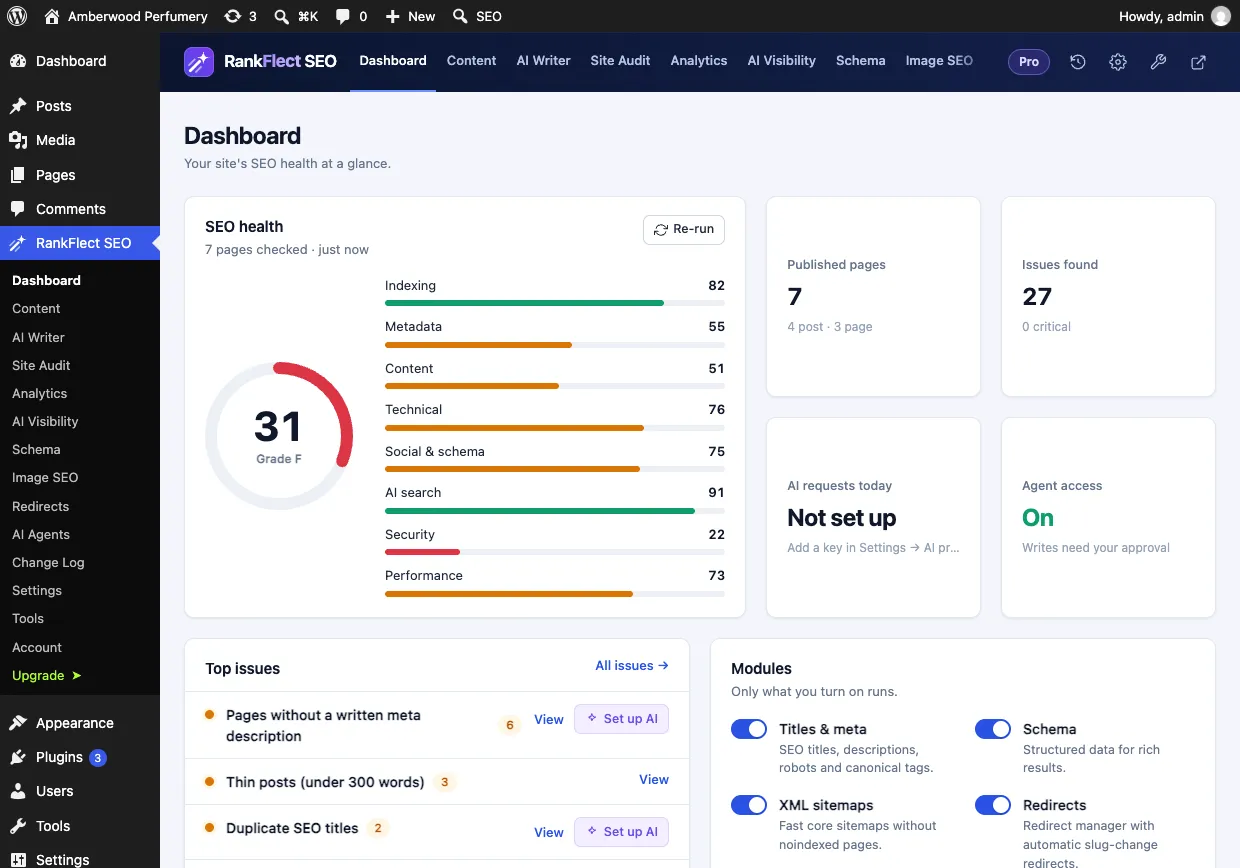
RankFlect SEO is our plugin, so read this section with that in mind. It is a newer plugin, free for unlimited sites with no time or usage limit, and available on WordPress.org. The free plugin includes titles and meta with templates, unlimited focus keywords, content and readability analysis, a schema manager on every post with a validator, XML sitemaps, a redirect manager (301, 302 and 307, exact match), a site audit with one-click fixes, llms.txt and switches for AI crawlers such as GPTBot and ClaudeBot.
Two things are less common on a free plan. AI features run on your own Anthropic, OpenAI, Gemini or OpenRouter key, or a local model, with no credits. And a built-in MCP server lets Claude, ChatGPT, Cursor or VS Code work on your SEO with scoped tokens, approval and undo. See RankFlect SEO Free vs Pro.
Where free stops: the 404 monitor, prefix and regex redirects, the broken link checker, the rank tracker, schema templates, AI visibility tracking and bulk AI are in RankFlect SEO Pro. Best for: site owners who want AI without buying credits, and teams starting to use AI agents.
Free features side by side
The quickest way to choose is to check the two features that most often push people to upgrade.
Redirect manager on the free plan:
- Included: Rank Math, Slim SEO, RankFlect SEO (exact match).
- Per post only: SEOPress.
- Paid plan: Yoast SEO, All in One SEO.
- Not included: The SEO Framework (use a separate redirect plugin).
AI on the free plan:
- Your own API key: Slim SEO, RankFlect SEO.
- A small free allowance with a vendor account: Rank Math.
- Paid plan or credits: Yoast SEO (Premium), All in One SEO (credits), SEOPress (PRO).
- None: The SEO Framework.
Which free SEO plugin is best for your site?
- A personal blog: Yoast SEO for guided writing feedback, or The SEO Framework if you want to set it and forget it.
- A growing content site: Rank Math or RankFlect SEO, for free redirects and several focus keywords per post.
- A WooCommerce shop: check product schema and redirect handling on the free plan. RankFlect SEO's free plugin includes full WooCommerce Product schema; advanced WooCommerce SEO, such as GTIN, MPN and ISBN fields and variation offers, is in Pro.
- An agency with many client sites: a plugin that is free on unlimited sites and imports from everything your clients already use. RankFlect SEO imports from seven SEO plugins plus Redirection.
- Anyone working with AI agents: RankFlect SEO, whose MCP server is free.
How to set up a free SEO plugin in 10 minutes
The steps are similar for every plugin. Here they are with RankFlect SEO; the quick start guide has screenshots.
- Install and activate. Go to Plugins → Add New Plugin, search for RankFlect SEO and click Install Now, then Activate. See install RankFlect SEO.
- Import your old plugin's data. In RankFlect SEO → Tools, use Import from another SEO plugin. It takes a backup first and never changes the old plugin's data. See switch from another SEO plugin.
- Deactivate the old plugin once you've checked a few pages, so only one plugin prints tags.
- Run the first audit from the Dashboard and fix anything marked Critical.
- Check the basics in Settings: title separator, home page title and description, default social image, organization or person, and verification codes.
- Submit your sitemap in Google Search Console.
For the full list of on-page and technical items to check after setup, use our WordPress SEO checklist. If RankFlect SEO fits your list, you can download it free.
Frequently asked questions
What is the best free SEO plugin for WordPress?
There is no single winner. Yoast SEO and Rank Math are the most installed. Rank Math, Slim SEO and RankFlect SEO include a free redirect manager, and The SEO Framework is the lightest. Pick the one whose free plan covers the jobs your site needs.
Is a free SEO plugin enough to rank on Google?
For most sites, yes. A free plugin handles titles, descriptions, sitemaps, canonicals and schema, which are the technical basics. Rankings depend far more on useful content, links and a crawlable site than on a paid plugin tier.
Can I use two free SEO plugins together?
No. Two SEO plugins print duplicate titles, meta descriptions and canonical tags. Use one, and import your data from the other before you deactivate it.
Do free SEO plugins include redirects?
Some do. Rank Math, Slim SEO and RankFlect SEO include a redirect manager on the free plan, and SEOPress free handles redirects per post. Yoast SEO and All in One SEO keep the redirect manager for their paid plans at the time of writing.
Can I switch free SEO plugins later without losing my work?
Usually, yes. Most SEO plugins can import titles, descriptions and robots settings from the big names. Check that the importer supports your current plugin, import, check a sample of pages, then deactivate the old plugin.
- #free seo plugin
- #wordpress seo
- #seo plugins
- #yoast seo
- #rank math
Written by
RankFlect SEO TeamThe people who build RankFlect SEO, the WordPress SEO plugin with a built-in MCP server. We write about what we learn shipping SEO tools for AI search.
All articles →Let AI agents fix your SEO. You keep the undo button.
RankFlect SEO is free for unlimited sites, with a built-in MCP server, approval for every change and no AI credits.