Free
Every change reviewed, every change reversible
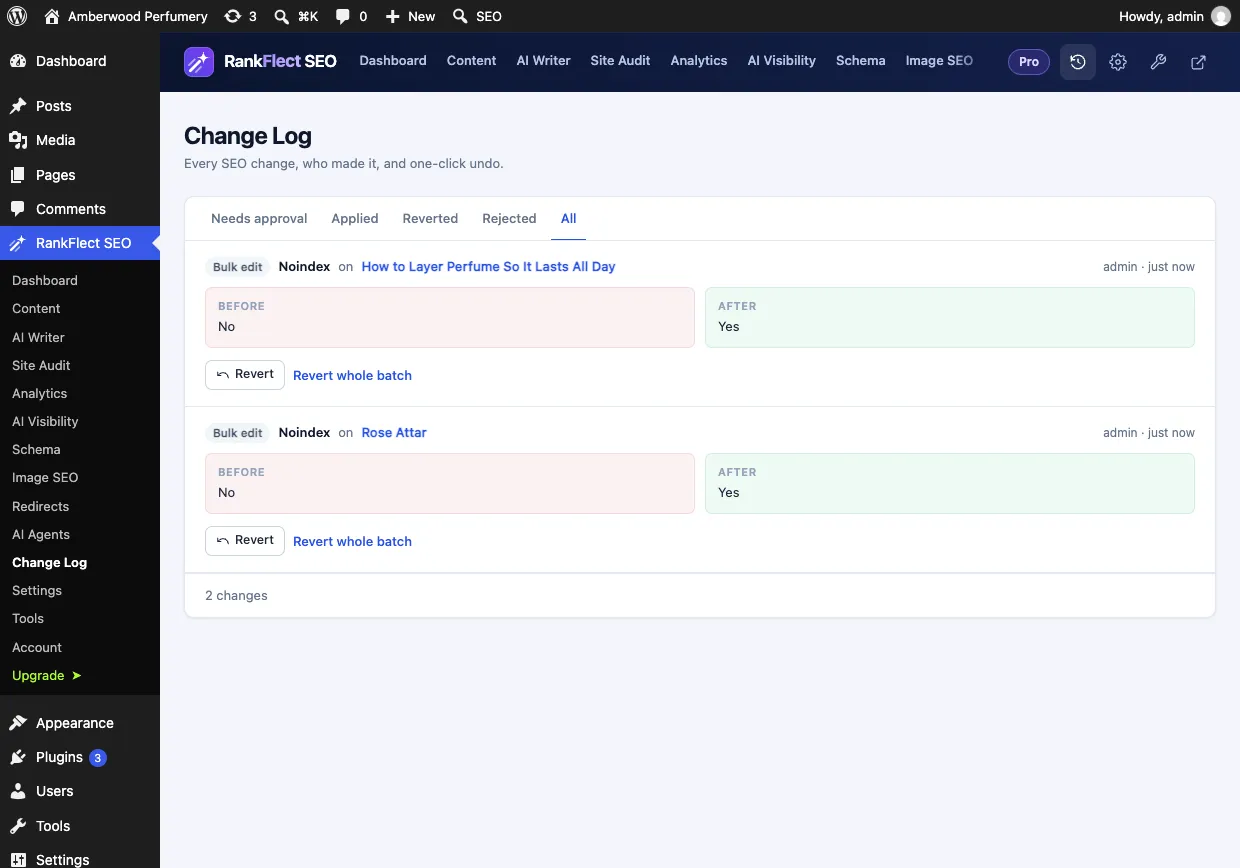
The Change Log records every SEO change on your site, with the value before and after and who made it. AI agent edits wait there for your approval, and anything applied can be reverted in one click.
What it does
Approval, dry run and undo
- Dry run: every agent write can return the old and new value without saving anything.
- Approval mode, on by default: agent edits wait in the Change Log until you approve or reject them.
- Site-wide changes such as settings, redirects, robots.txt and backups always wait for approval.
- Undo any applied change, one at a time or a whole batch, such as an import or a bulk edit.
- Editor saves, bulk edits, AI suggestions, imports, audit fixes and agent calls are all logged.
- A red count in the menu and the admin bar when changes are waiting for you.
How it works
Three steps
- 1
An agent proposes a change
It previews the change with a dry run, then submits it with a reason.
- 2
You review it
Open RankFlect SEO → Change Log → Needs approval and compare the before and after values.
- 3
Approve, reject or undo
Approve to make it live or reject it. Changed your mind later? Revert it, or revert the whole batch.
Free and Pro
Free, with more in Pro
The Change Log, dry runs, approval mode and undo are free. With RankFlect SEO Pro, the log also covers Pro data such as locations, product identifiers and schema templates.
FAQ
Approval, dry run and undo: questions
Can I undo a change made weeks ago?
Yes. Every applied change keeps its old value in the Change Log, so you can revert it from WordPress at any time, without asking the AI tool.
Can I let agents apply changes without approval?
Yes. Turn off approval for agent changes in RankFlect SEO → AI Agents. Edits to posts, terms and images then apply at once and stay revertable; site-wide changes still wait for approval.
Who can approve changes?
Administrators, and any role you give the approval permission in the role manager.
Keep exploring
Related features
- AI agents and MCPFreeLet Claude, ChatGPT, Cursor or VS Code work on your WordPress SEO through a built-in MCP server, with scoped tokens, approval and undo.Learn more
- SEO AutopilotProScheduled jobs prepare missing meta descriptions, alt text, internal links and audit fixes. Nothing goes live until you approve it.Learn more
- AI on your own keyFreeWrite SEO titles, meta descriptions, alt text, briefs and drafts with Claude, OpenAI, Gemini, OpenRouter or a local model. You pay your provider at cost.Learn more
Try it on your own site
Free for unlimited sites. Try every Pro feature for 14 days, no card needed.