Free
Let AI agents work on your SEO, safely
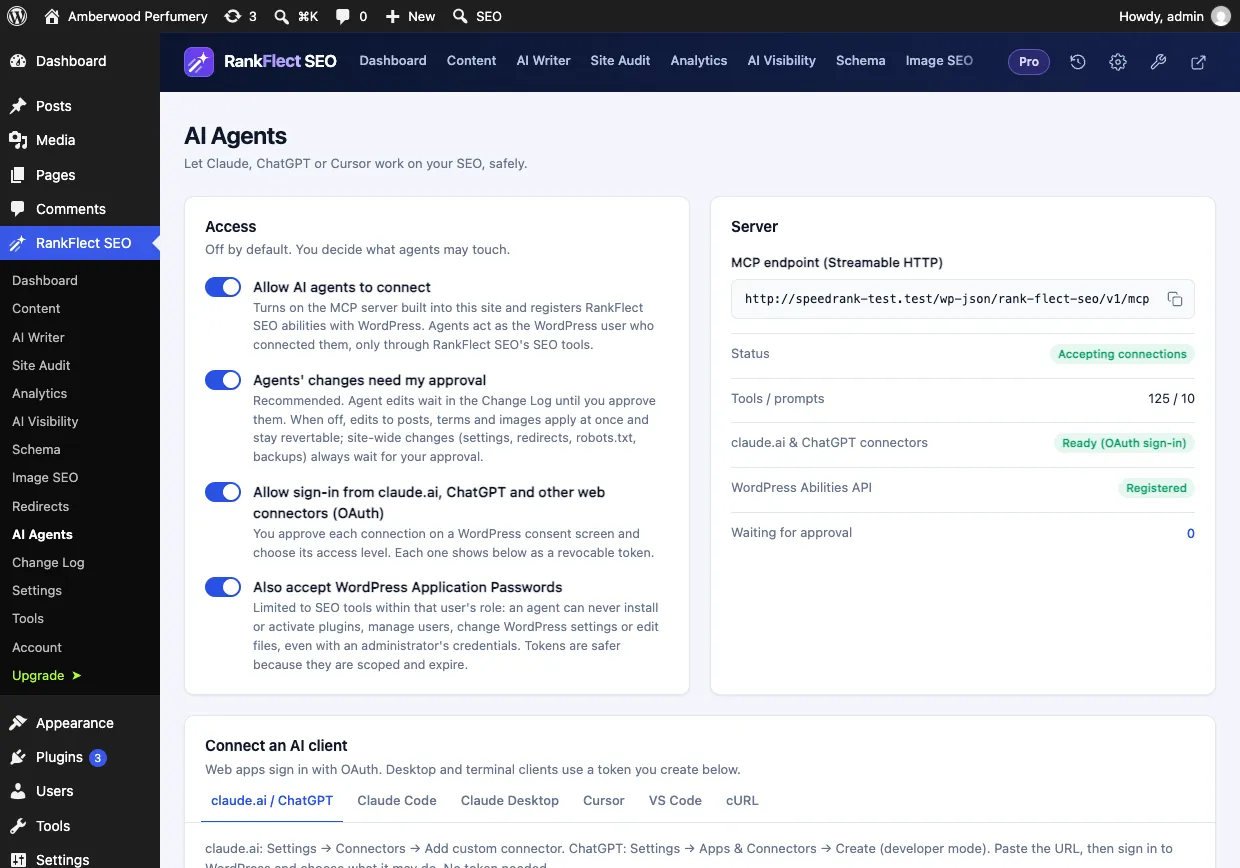
RankFlect SEO has an MCP server built in, so Claude, ChatGPT, Cursor, VS Code and other MCP clients can audit and fix your SEO. You decide what an agent may touch, you approve its edits, and you can undo any change.
What it does
AI agents and MCP
- 101 SEO tools in the free plugin, 128 with RankFlect SEO Pro, with no companion plugin.
- claude.ai and ChatGPT connect by URL: you sign in on a WordPress consent screen and choose read only, content editor or full access.
- Claude Code, Claude Desktop, Cursor and VS Code connect with a scoped token and a setup snippet RankFlect SEO writes for you.
- Agent access is off by default, and tokens are limited per area and can expire.
- Agents can never install plugins, manage users, change WordPress settings or edit files, even with an administrator’s token.
- Ready-made prompts your AI client can run as slash commands, from an SEO health check to drafting an article.
How it works
Three steps
- 1
Turn on agent access
Open RankFlect SEO → AI Agents and allow agents to connect. Approval for agent changes is on by default.
- 2
Connect your AI client
Add your site to claude.ai or ChatGPT by URL, or create a token and paste the snippet into Claude Code, Cursor or VS Code.
- 3
Ask, review, approve
Ask the agent to audit or fix something. Its edits wait in the Change Log until you approve them, and each one can be undone.
Free and Pro
Free, with more in Pro
The MCP server, the claude.ai and ChatGPT connection, scoped tokens, approval and undo are all free. RankFlect SEO Pro adds tools that use Pro features, such as AI visibility, rank tracking and bulk work.
FAQ
AI agents and MCP: questions
Do I need Pro to connect claude.ai or ChatGPT?
No. Connecting claude.ai, ChatGPT or any other MCP client is free. Pro adds more tools for agents to use.
Can an AI agent break my site?
Agent access is off by default. Tokens are scoped per area, writes can be previewed with a dry run, approval mode holds changes until you approve them, and every applied change can be undone.
Do I need to install anything on my computer?
Not for claude.ai or ChatGPT: they connect by URL. Desktop and terminal clients such as Claude Code, Cursor and VS Code use your site’s MCP endpoint and a token.
Which MCP clients work?
Any client that supports Streamable HTTP, including claude.ai, ChatGPT, Claude Code, Claude Desktop, Cursor and VS Code.
Keep exploring
Related features
- Approval, dry run and undoFreePreview every AI agent change with a dry run, hold edits in an approval queue and undo any change, one at a time or as a batch, in RankFlect SEO.Learn more
- SEO AutopilotProScheduled jobs prepare missing meta descriptions, alt text, internal links and audit fixes. Nothing goes live until you approve it.Learn more
- AI on your own keyFreeWrite SEO titles, meta descriptions, alt text, briefs and drafts with Claude, OpenAI, Gemini, OpenRouter or a local model. You pay your provider at cost.Learn more
Try it on your own site
Free for unlimited sites. Try every Pro feature for 14 days, no card needed.